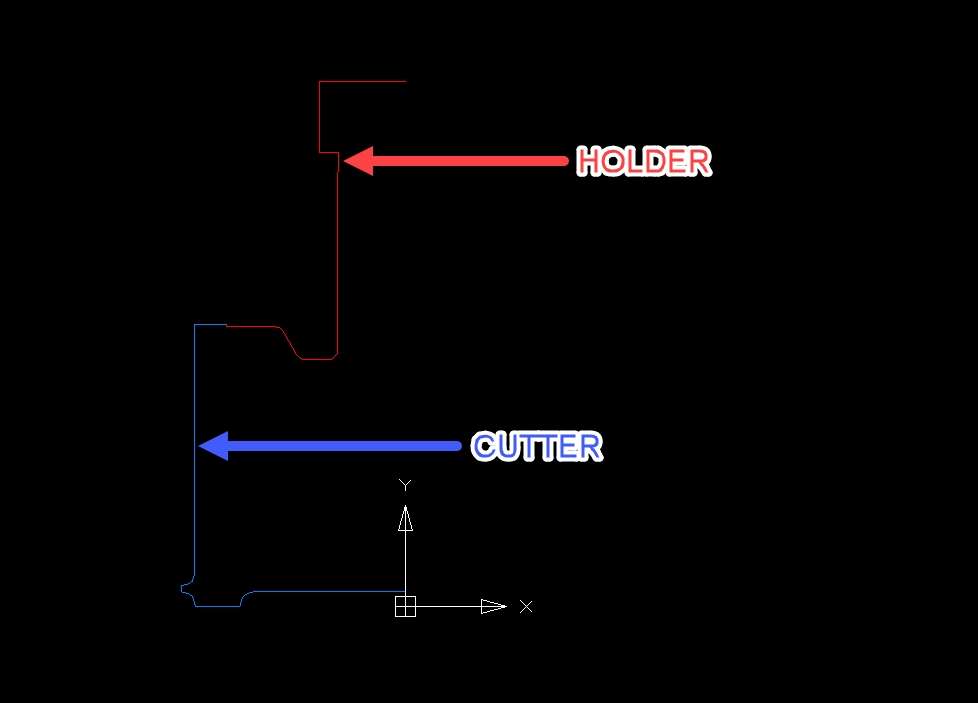
To load a tool drawing in Archimede in DXF format, you must prepare the drawing in a proper way.
Drawing guidelines:
• the drawing shows the contours of the tool (left contour, dividing the tools along the axis).
• the drawing should be prepared using the line and arc options in the CAD program. In the case of drawings for Archimede, we do not use the polyline option.
• the drawing should be built using two layers:
- with the layer called HOLDER, we draw the top part of the tool that should not touch the element,
- with a layer called CUTTER, we draw the working part of the tool.
Other layers cannot appear in the drawing.
Drawing guidelines:
• the drawing shows the contours of the tool (left contour, dividing the tools along the axis).
• the drawing should be prepared using the line and arc options in the CAD program. In the case of drawings for Archimede, we do not use the polyline option.
• the drawing should be built using two layers:
- with the layer called HOLDER, we draw the top part of the tool that should not touch the element,
- with a layer called CUTTER, we draw the working part of the tool.
Other layers cannot appear in the drawing.