


1. Print - generate prints for incoming materials pre-filtered "by date" and by "supplier, invoice, date"
2. Purchase - shows purchase order number
3. Delivery Progr. - shows delivery progress in case of partials incomings (it is automatically filled in with next increasing number in case of delivery is received in more than one receivings). It can be changed manually
4. Invoice No. - to be used freely for entering invoice number if there is any
5. Shippping Note - to be used freely for entering invoice number if there is any
6. Description - automatic note from Archimede informing about type of operation assigned to incomning. It can be modified manually.
7. Supplier - shows info about supplier
8. Operator - it allows for selection of operator that received delivery (available if User Management module is activated)
9. Control Operator - it allows for selection of operator that received delivery (available if User Management module is activated)
10. Category - to be freely used to establish category for incoming (Rectification, Broken, Normal Operation, Scrap, Reusable)
11. Invoicing Currency - shows information about currency for which incoming was accepted
12. Rate - allows to insert rate of conversion and allows to convert value of the stock into desired Currency. When rate is changed, then cost for each material from incoming is being calculated by this conversion rate
2. Purchase - shows purchase order number
3. Delivery Progr. - shows delivery progress in case of partials incomings (it is automatically filled in with next increasing number in case of delivery is received in more than one receivings). It can be changed manually
4. Invoice No. - to be used freely for entering invoice number if there is any
5. Shippping Note - to be used freely for entering invoice number if there is any
6. Description - automatic note from Archimede informing about type of operation assigned to incomning. It can be modified manually.
7. Supplier - shows info about supplier
8. Operator - it allows for selection of operator that received delivery (available if User Management module is activated)
9. Control Operator - it allows for selection of operator that received delivery (available if User Management module is activated)
10. Category - to be freely used to establish category for incoming (Rectification, Broken, Normal Operation, Scrap, Reusable)
11. Invoicing Currency - shows information about currency for which incoming was accepted
12. Rate - allows to insert rate of conversion and allows to convert value of the stock into desired Currency. When rate is changed, then cost for each material from incoming is being calculated by this conversion rate


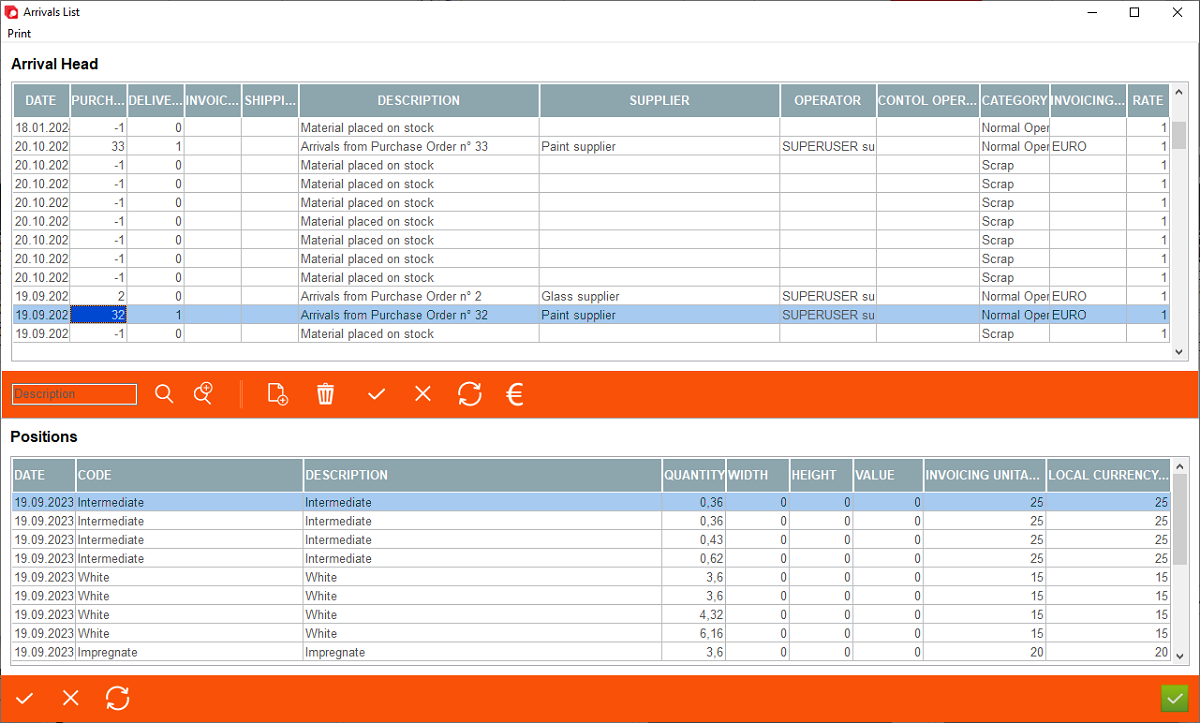


13. Searching
14. Searching criteria - possibity to filter "Incomings"
15. Control buttons: add new one, delete, confirm changes, abort changes, refresh, recalculate value.
16. Quantity - quantity of received material (this may vary depending on materials and setting)
17. Width, Height - width & height for materials e.g. glass, sillars
18. Value - shows value of material (this may vary depending on materials and setting)
19. Invoicing Unitary Cost - shows unitary cost before conversion from currency (11) by the conversion rate (12) - it must be entered manually
20. Local Currency Unitary Cost - shows unitary cost after converson from currency (11) by the conversion rate (12) - it is converted automatically
14. Searching criteria - possibity to filter "Incomings"
15. Control buttons: add new one, delete, confirm changes, abort changes, refresh, recalculate value.
16. Quantity - quantity of received material (this may vary depending on materials and setting)
17. Width, Height - width & height for materials e.g. glass, sillars
18. Value - shows value of material (this may vary depending on materials and setting)
19. Invoicing Unitary Cost - shows unitary cost before conversion from currency (11) by the conversion rate (12) - it must be entered manually
20. Local Currency Unitary Cost - shows unitary cost after converson from currency (11) by the conversion rate (12) - it is converted automatically


