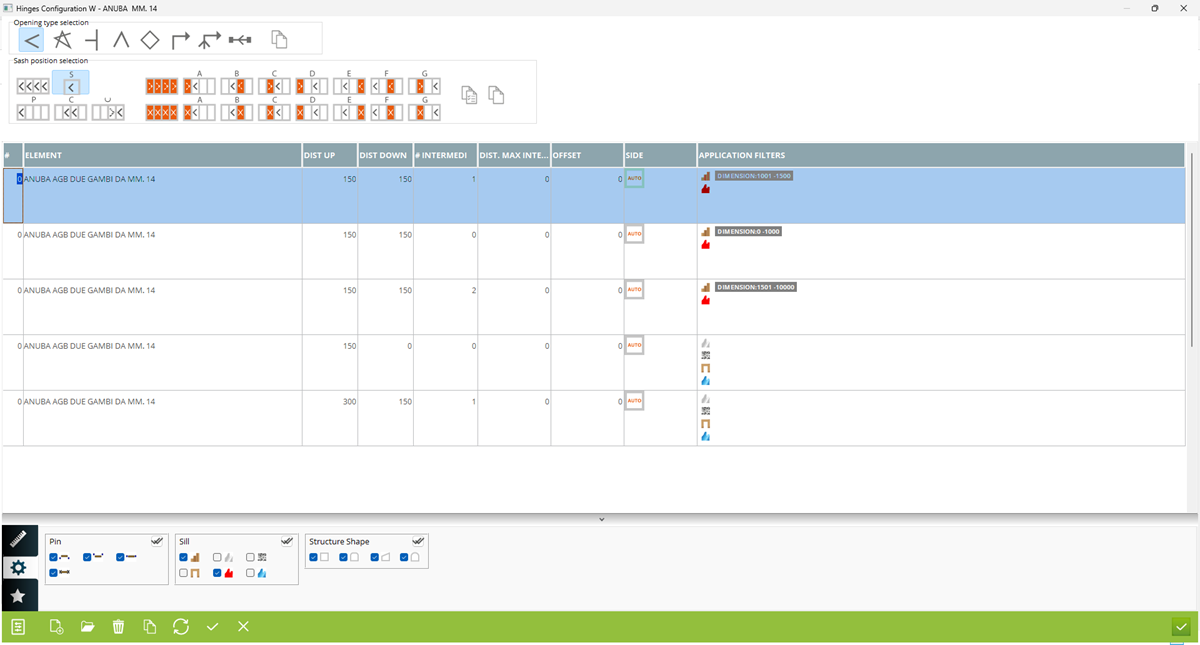



1. Name of opened hinges configuration
2. Selection opening type. You have to configure elements application for each opening type
3. Copy configured data between opening types
4. Selection position of active sash. For selected opening type, you have to conigure hardware elements application for particular position of active sashes, receiving sashes, fixed sashes. You can configure for example for all active sashes, for single sash or for other situation from images
5. Selection position of receiving sash
6. Selection position of fixed sash
7. Copy selected items between sash position
8. Copy selected single item between sash position
9. Sequence on list
10. Name of hardware element. When would you like to add new hardware element, you have to click in empty space here and then select the hardware element from list
11. Distance Up - select distance position of hardware element from the top corner of the sash
12. Distance Down - select distance position of hardware element from the bottom corner of the sash
2. Selection opening type. You have to configure elements application for each opening type
3. Copy configured data between opening types
4. Selection position of active sash. For selected opening type, you have to conigure hardware elements application for particular position of active sashes, receiving sashes, fixed sashes. You can configure for example for all active sashes, for single sash or for other situation from images
5. Selection position of receiving sash
6. Selection position of fixed sash
7. Copy selected items between sash position
8. Copy selected single item between sash position
9. Sequence on list
10. Name of hardware element. When would you like to add new hardware element, you have to click in empty space here and then select the hardware element from list
11. Distance Up - select distance position of hardware element from the top corner of the sash
12. Distance Down - select distance position of hardware element from the bottom corner of the sash
13. Intermediate - insert the quantity of hinges applied between first and last hinge set in point 11 and 12. Leave 0 to do not apply
14. Max intermediate distance - maximum free distance after which Archimede should apply additional quantity to hinges set in point 13. Leave 0 to do not use it
15. Offset - positive value move element more inside sash and negative value more to the ouside of the sash
16. Select side of application or leave AUTO option (in this way depend of opening type, Archimede will recognize the hinges side)
17. Application filters - open filters option by double click on this field (20). Double click again to hide filters
18. Application filters - click to open filters (19). Click again to hide them
19. Application filters. You can filter for example by dimensions, angle, weight, type of treshold, etc.
20. Add new element in configuration
21. Open selected hardware element definition
22. Remove hardware element
23. Copy selected hardware element with configured parameters
14. Max intermediate distance - maximum free distance after which Archimede should apply additional quantity to hinges set in point 13. Leave 0 to do not use it
15. Offset - positive value move element more inside sash and negative value more to the ouside of the sash
16. Select side of application or leave AUTO option (in this way depend of opening type, Archimede will recognize the hinges side)
17. Application filters - open filters option by double click on this field (20). Double click again to hide filters
18. Application filters - click to open filters (19). Click again to hide them
19. Application filters. You can filter for example by dimensions, angle, weight, type of treshold, etc.
20. Add new element in configuration
21. Open selected hardware element definition
22. Remove hardware element
23. Copy selected hardware element with configured parameters
Here you can define application of hinges


