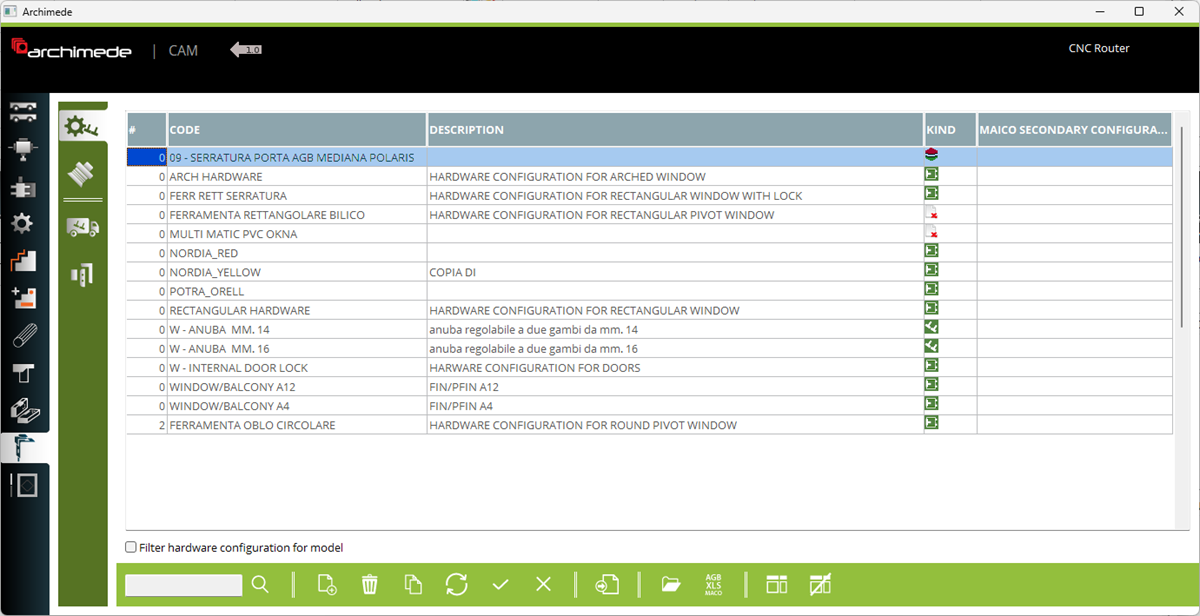



Here you can manage the hardware configuration. For each configuration is necessary to define if use for handle or hinges side or if associated with external file.


1. Hardware configuration - This is a place wher user can create or edit configuration and set hardware elements in configuration for handle side and for hinges side
2. Hardware elements - This is a place where user can create or edit hardware elements
3. Hardware supplier - This is a place where user can create a hardware supplier
4. Hardware group - This is a place where user can create a hardware group
5. Sequence on list.
6. Hardware configuration name
2. Hardware elements - This is a place where user can create or edit hardware elements
3. Hardware supplier - This is a place where user can create a hardware supplier
4. Hardware group - This is a place where user can create a hardware group
5. Sequence on list.
6. Hardware configuration name
7. Hardware configuration description
8. Select kind of configuration. Select between handle configuration, hinges configuration or from external software
9. Enable to activate possibility to filter configuration by model
10. Add new hardware configuration
11. Remove selected configuration
12. Copy selected configuration
13. Open selected configuration (Handle side or Hinges side) (you can also open configuration by double click on name or description)
8. Select kind of configuration. Select between handle configuration, hinges configuration or from external software
9. Enable to activate possibility to filter configuration by model
10. Add new hardware configuration
11. Remove selected configuration
12. Copy selected configuration
13. Open selected configuration (Handle side or Hinges side) (you can also open configuration by double click on name or description)


