


All the drawings in DXF format that we are going to associate in the profile mask of Archimede will have to follow some very precise rules:
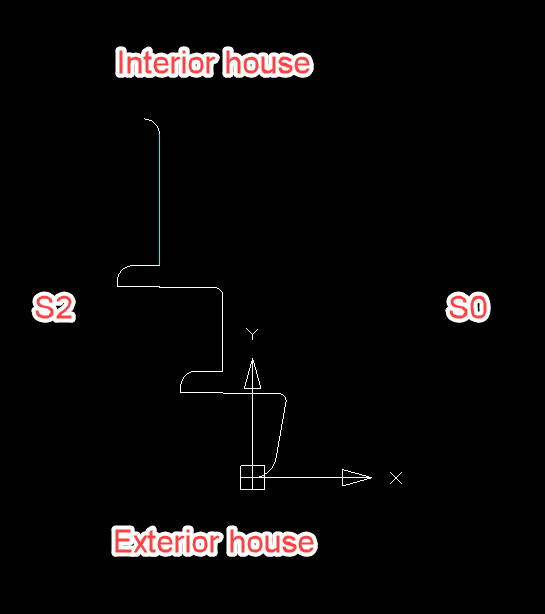
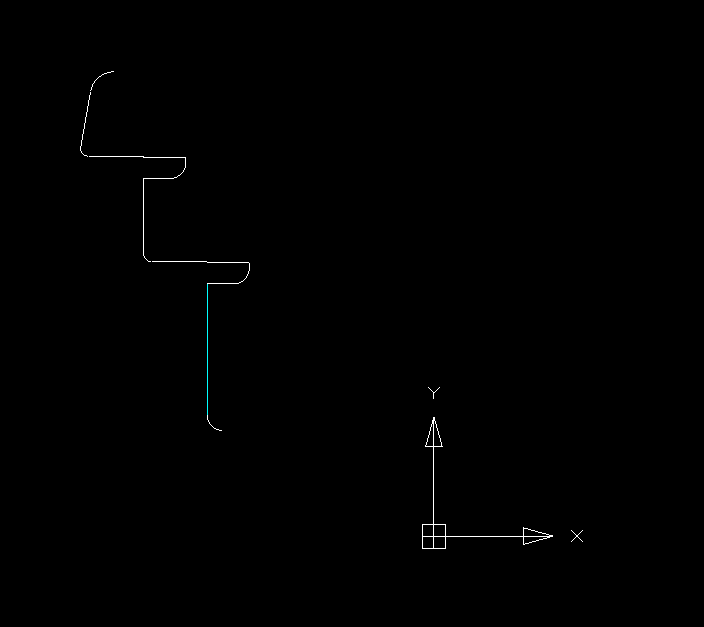
1. The profile must be standing, so with the base side external the house (and as seen on the panel of the machine) while with the upper part interior the house. Another fundamental rule is that the profile is always facing to the right.
Example of a correctly prepared drawing:
Example of an incorrectly prepared drawing:
2. In the CAD program used, the profiles must have specific LAYERS for each component of the drawing:
DRAW This is the layer that must be associated on the fixed part (not variable) and that makes the program understand the dimensions of the profile.
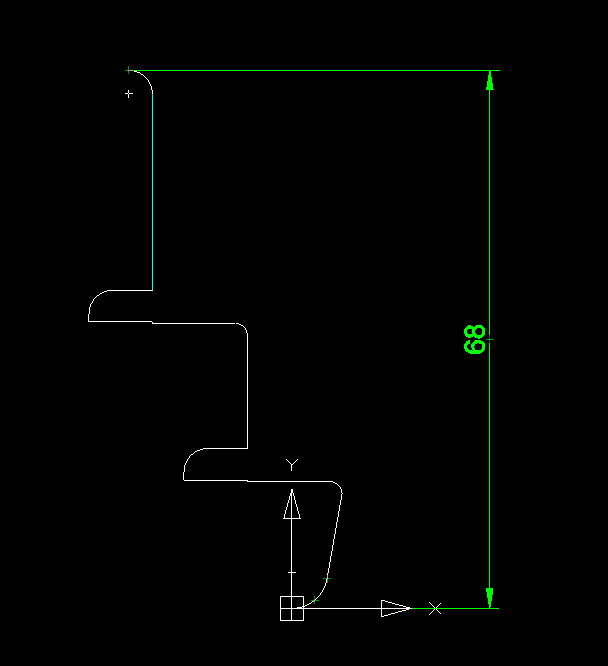
MODIFY This is the layer that is always and exclusively associated with a straight line of the profile and which indicates the "variable" part, that is, that part of the extendable or shortenable profile of the drawing.
For example: it often happens to have the profile of a product of thickness 68 identical to the profile of the same product of thickness 78, except for a part of a straight profile that is longer, in this case, of 10 mm.
It is therefore possible, by associating this straight "extendable" part with the MODIFY layer, to use the same DXF drawing for both product 68 and 78..
For example: it often happens to have the profile of a product of thickness 68 identical to the profile of the same product of thickness 78, except for a part of a straight profile that is longer, in this case, of 10 mm.
It is therefore possible, by associating this straight "extendable" part with the MODIFY layer, to use the same DXF drawing for both product 68 and 78..
Legend of the photo:
In white layer DRAW
In cyan layer MODIFY
Important note:
The MODIFY layer cannot be associated with either the first section at the bottom or the first section at the top.
For example, if we have a smooth profile, we need to put a line at the bottom and top of the DRAW layer (which determines the reference thickness) and put the line in MODIFY in the middle.
In cyan layer MODIFY
Important note:
The MODIFY layer cannot be associated with either the first section at the bottom or the first section at the top.
For example, if we have a smooth profile, we need to put a line at the bottom and top of the DRAW layer (which determines the reference thickness) and put the line in MODIFY in the middle.


