




1. Description of configuration - This is where user enter the name of the configuration
2. Machine phase - This is a place where user choose the machine phase for using scraps configuration
3. Scraps for external elements - This is a place where user set scraps for external elements
4. Scraps for Arch elements - This is a place where user set scraps for arch elements
5. Scraps configuration for other elements - This is a place where user set scraps for other elements
6. Scraps for sills - This is a place where user set scraps for sills
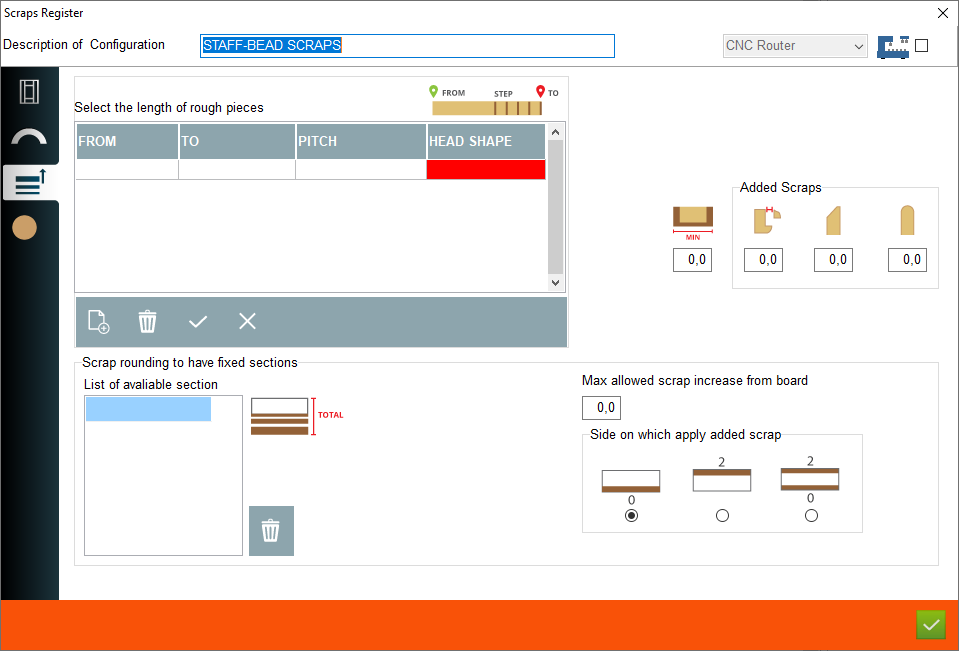
7. Definition of material with scraps - This is where the user can set the typical wood length from - to, for example, the user can define that the available material in the length range 0mm to 1500mm is available in 10mm increments can set this and the program, when generating the cutting list, will select the material to use in this range
2. Machine phase - This is a place where user choose the machine phase for using scraps configuration
3. Scraps for external elements - This is a place where user set scraps for external elements
4. Scraps for Arch elements - This is a place where user set scraps for arch elements
5. Scraps configuration for other elements - This is a place where user set scraps for other elements
6. Scraps for sills - This is a place where user set scraps for sills
7. Definition of material with scraps - This is where the user can set the typical wood length from - to, for example, the user can define that the available material in the length range 0mm to 1500mm is available in 10mm increments can set this and the program, when generating the cutting list, will select the material to use in this range
8. Minimum lenght of pieces - This is a place where user set minimum lenght for elements, if element have a smaller lenght add a scraps to minimum lenght sets
9. Scraps for glazing beads - This is a place where user set additional scraps for glazing bead
10. Scraps for heads with angled ends - Heads scraps with angled ends
11. Scraps for heads with radius ends - Heads scraps with radius ends
12. Available section - This is a place where user can set available section, if user add a sections, program know to use defined sections for cutting list
13. Max allowed scrap increase from board - This is a place where user can set allowed scrap for sill
14. Choose the side - This is a place to choose a side where program must add a scrap the same as on picture
9. Scraps for glazing beads - This is a place where user set additional scraps for glazing bead
10. Scraps for heads with angled ends - Heads scraps with angled ends
11. Scraps for heads with radius ends - Heads scraps with radius ends
12. Available section - This is a place where user can set available section, if user add a sections, program know to use defined sections for cutting list
13. Max allowed scrap increase from board - This is a place where user can set allowed scrap for sill
14. Choose the side - This is a place to choose a side where program must add a scrap the same as on picture
This is the place in the program where the user can add or edit scraps configuration for other mould elements


