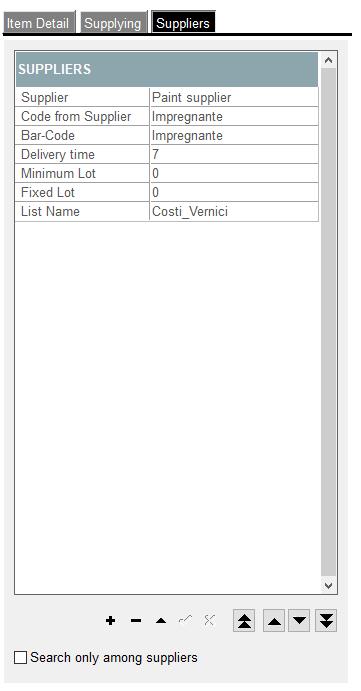
1. Suppliers:
• Supplier - shows name of the supplier that delives this particular material. There can be more than one supplier on this list.
It is a Must Thing To Remember that supplier that is on the very first top place on this list, is considered by Archimede as so called Principle Supplier for ordering materials. This means that when "Purchase Offer" or "Purchase Order" for Principle Supplier is being raised, then Archimede will issue automatically "Purchase Offer" or "Purchase Order" to this supplier.
• Code from Supplier - in here user defines the code of material that is assigned to material by the supplier
• Bar-Code - in here user defines bar codes for materials differnet than Code from supplier. There must be uniqe sequence of characters for each of material: first sequence of characters considered for barcode is from column "Code from supplier", then "Bar Code" and then from column "code" for each material - those are needed for scanning materials via Android App
• Delivery Time - Time needed by supplier to arrange delivery of ordered materials (it is being combined with Days Advance from Supplying tab. For the Users that use Planning it is possible to set additional time in Settings for Planning Calendar (Needs Availability).
• Minimum Lot - minimum number of Pack Formats
• Fixed Lot - ordering by the number of "Minimum Lots". For example: fixed lot=5 then this supplier sells every "5 fixed" of minimum lots, so can be ordered by 5 lots, 10lots, 15lots, 20lots, etc
• List Name - price list selected for this item in store
2. Options for adding, removing, moving suppliers up and down
• Supplier - shows name of the supplier that delives this particular material. There can be more than one supplier on this list.
It is a Must Thing To Remember that supplier that is on the very first top place on this list, is considered by Archimede as so called Principle Supplier for ordering materials. This means that when "Purchase Offer" or "Purchase Order" for Principle Supplier is being raised, then Archimede will issue automatically "Purchase Offer" or "Purchase Order" to this supplier.
• Code from Supplier - in here user defines the code of material that is assigned to material by the supplier
• Bar-Code - in here user defines bar codes for materials differnet than Code from supplier. There must be uniqe sequence of characters for each of material: first sequence of characters considered for barcode is from column "Code from supplier", then "Bar Code" and then from column "code" for each material - those are needed for scanning materials via Android App
• Delivery Time - Time needed by supplier to arrange delivery of ordered materials (it is being combined with Days Advance from Supplying tab. For the Users that use Planning it is possible to set additional time in Settings for Planning Calendar (Needs Availability).
• Minimum Lot - minimum number of Pack Formats
• Fixed Lot - ordering by the number of "Minimum Lots". For example: fixed lot=5 then this supplier sells every "5 fixed" of minimum lots, so can be ordered by 5 lots, 10lots, 15lots, 20lots, etc
• List Name - price list selected for this item in store
2. Options for adding, removing, moving suppliers up and down