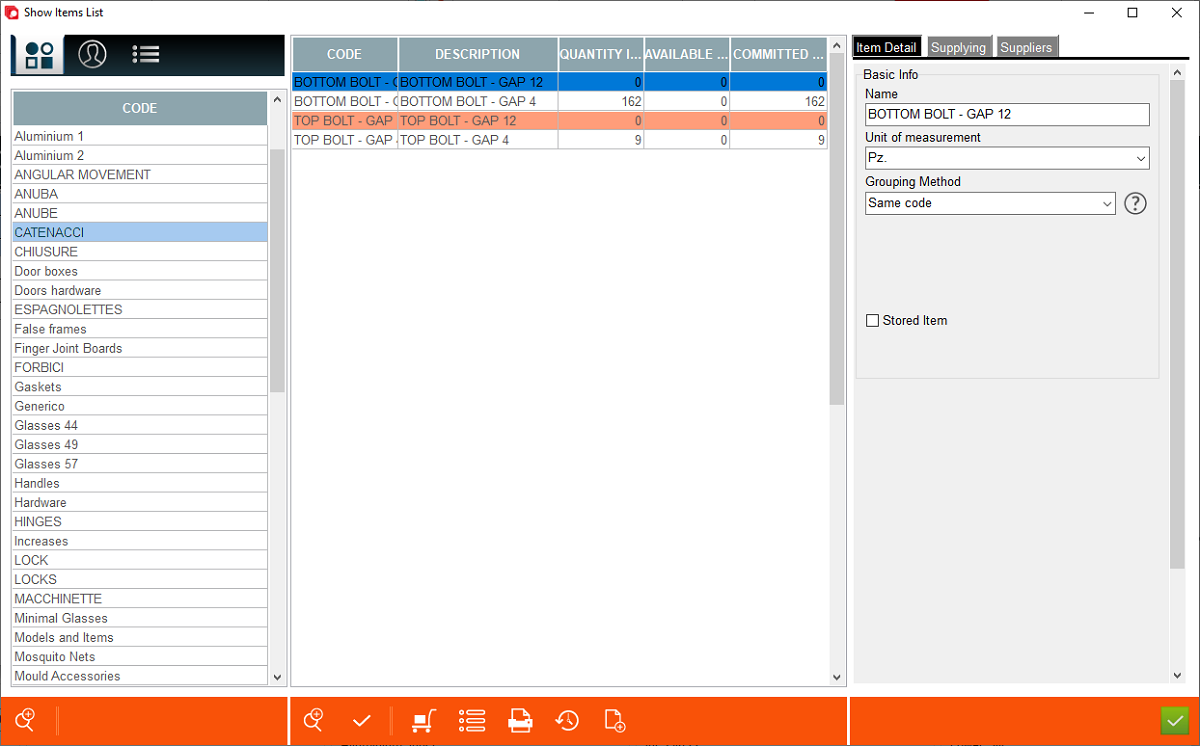



This is a primary store window, where user has ability to manage materials and their settings.
1. Materials pre-filtered by groups of materials
2. Materials pre-filtered by suppliers
3. Materials not pre-filtered by any parameters (all materials present in the store register)
4. Item details - List of parameters to be set for each material.
5. Supplying data - List of parameters to be set for each material
6. Supplier - List of parameters to be set for each material
7. Simple search window - allows user to search materials only using their code
8. Advanced search window - more advanced searching (can be combined with pre-filtering 1,2,3)
2. Materials pre-filtered by suppliers
3. Materials not pre-filtered by any parameters (all materials present in the store register)
4. Item details - List of parameters to be set for each material.
5. Supplying data - List of parameters to be set for each material
6. Supplier - List of parameters to be set for each material
7. Simple search window - allows user to search materials only using their code
8. Advanced search window - more advanced searching (can be combined with pre-filtering 1,2,3)


9. Save changes button
10. Default definition - modify default data of selected items
11. Open register associated with the selected item
12. Print - status of items
13. Show movements associated with selected item.
14. Add selected need to the list.
10. Default definition - modify default data of selected items
11. Open register associated with the selected item
12. Print - status of items
13. Show movements associated with selected item.
14. Add selected need to the list.