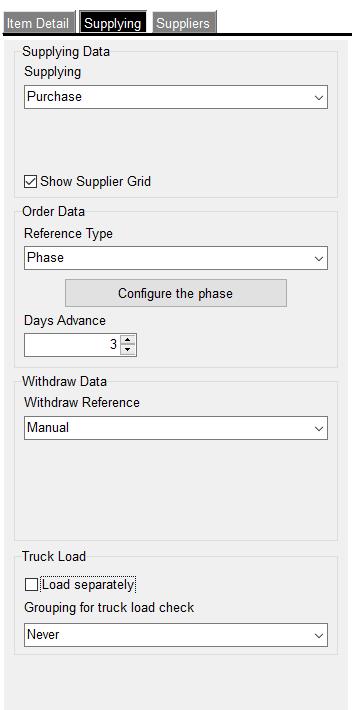
1. Supplying data - allow user to establish the source of material
• Purchase
• Inner product
2. Order data
• Reference type - allows user to specify if purchase order for the material should be placed in advance depending on:
- Time of order - "Put into production"
- When production of the order should end - "Delivering date"
- Production "Phase" - when selected, the user will have possibility to chose Production Cycle and Planned Phase before which the order for materials will be placed.
• Days Advance - allows to define how many days before selection made in previous point (Reference type), purchase order should be issued
3. Withdraw Data
• Withdraw Reference - allows user to establish when Archimede should release material from the store. Withdraw can be made in two ways:
- Manual Withdraw that can be carried on directly from the "Selected Order Needs", "Needs Management" screens, and directly from the menu "Withdraw Items"
- Automatic Withdraw - in order to establish Automatic withdraw user must tell to Archimede when to withdraw material from the store. Available options are at the "Starting Phase" and at the "Phase End". After selecting one of these options there appears configuration screen for withdrawing material in specified Prodcution Cycle in specified Planned Phase. Once Withdraw referene is configured, then Archimede makes automatic withdraws for materials in each starting/edning of the defined planned phase in production cycle.
4. Truck Load
• Possibility to indicate for each item whether it must be loaded separately on the truck (and therefore checked separately) or not, and to specify the grouping method that should be used in the truck load check printout and in the Archimede App.
• Purchase
• Inner product
2. Order data
• Reference type - allows user to specify if purchase order for the material should be placed in advance depending on:
- Time of order - "Put into production"
- When production of the order should end - "Delivering date"
- Production "Phase" - when selected, the user will have possibility to chose Production Cycle and Planned Phase before which the order for materials will be placed.
• Days Advance - allows to define how many days before selection made in previous point (Reference type), purchase order should be issued
3. Withdraw Data
• Withdraw Reference - allows user to establish when Archimede should release material from the store. Withdraw can be made in two ways:
- Manual Withdraw that can be carried on directly from the "Selected Order Needs", "Needs Management" screens, and directly from the menu "Withdraw Items"
- Automatic Withdraw - in order to establish Automatic withdraw user must tell to Archimede when to withdraw material from the store. Available options are at the "Starting Phase" and at the "Phase End". After selecting one of these options there appears configuration screen for withdrawing material in specified Prodcution Cycle in specified Planned Phase. Once Withdraw referene is configured, then Archimede makes automatic withdraws for materials in each starting/edning of the defined planned phase in production cycle.
4. Truck Load
• Possibility to indicate for each item whether it must be loaded separately on the truck (and therefore checked separately) or not, and to specify the grouping method that should be used in the truck load check printout and in the Archimede App.