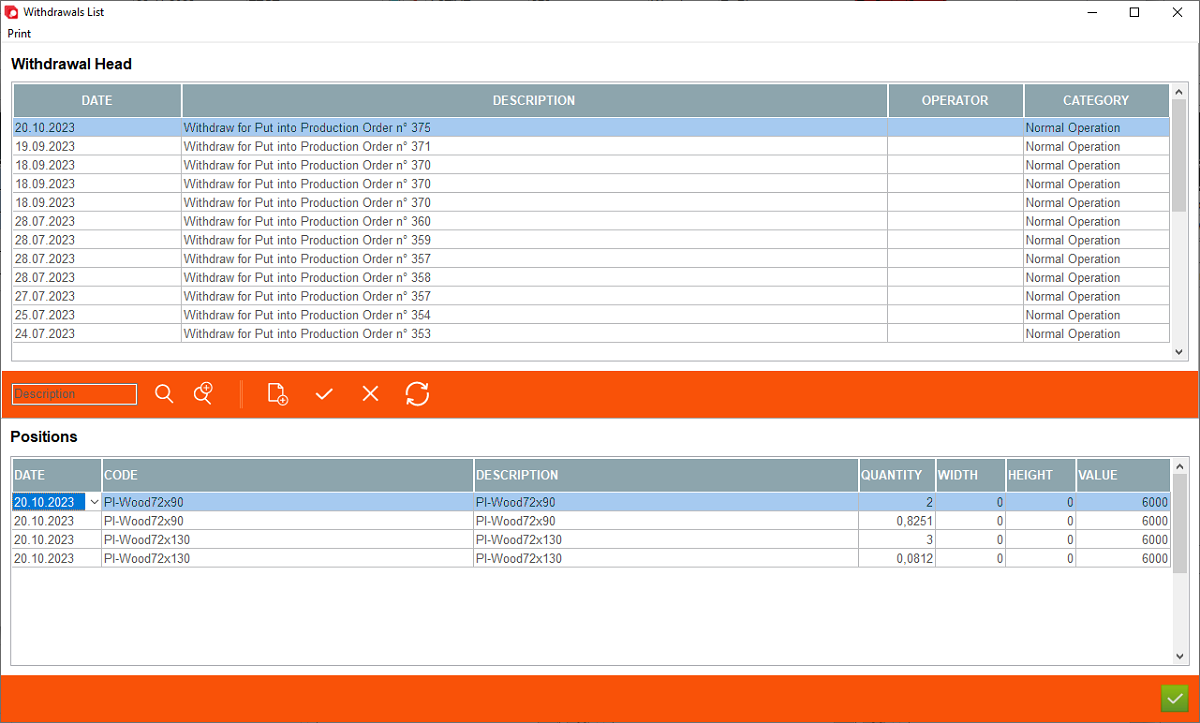




1. Print - generate print for the withdrawn materials
2. Describtion - automatic note from Archimede informing about type of operation assigned to Withdrawal. It can be changed manually.
3. Operator - it allows for selection of operator that received delivery (available if User Management module is activated)
4. Category - to be freely used to establish category for Withdrawals (Rectification, Broken, Normal Operation, Scrap, Reusable)
5. Search function - with available filters allowing to filter "Withdrawals"
2. Describtion - automatic note from Archimede informing about type of operation assigned to Withdrawal. It can be changed manually.
3. Operator - it allows for selection of operator that received delivery (available if User Management module is activated)
4. Category - to be freely used to establish category for Withdrawals (Rectification, Broken, Normal Operation, Scrap, Reusable)
5. Search function - with available filters allowing to filter "Withdrawals"


6. Standard menu for adding/removing removing records to each register
7. Quantity - quantity of withdrawn material (this may vary depending on materials and setting)
8. Width, Height - width & height for materials e.g. glass, sillars
9. Value - shows value of material (this may vary depending on materials and setting)
7. Quantity - quantity of withdrawn material (this may vary depending on materials and setting)
8. Width, Height - width & height for materials e.g. glass, sillars
9. Value - shows value of material (this may vary depending on materials and setting)
Shows list of all withdrawals of the stock. This is a list of registered wihdraws/modifies of materials out of the store in date range depending on applied filters. This register is filled in autoamtically after each operation related with withdrawing stock form store is performed. In addition, Archimede user can add/remove withdraws manually using appropriate "+" and "-" button.
Withdrawal of materials can be done using automatic and manual method of withdrawals. For further details please go to "Supplying - Withdraw Data".


