


1. The place to insert the name of the working - For example, in working to make the workings more clearly defined, it is recommended to specify Lxxx - where L stands for the working length of the tool (the red line in the tool preparation) Rxx - where R means the working radius (x) - where it means the tool offset and Zxx - where it means the tool correction relative to the working length of the tool. E.g. L160 R49 (0) Z0
2. Name of the tool for that working
3. Working type - a place to choose the working type
4. Working radius - The place to set the working radius. Note: All of the workings must have the same working radius
5. Azimuth angle - A place to set the angle of working
6. Sequence - the place to set the sequence of that working. Note: Better to set the sequence on profile logic to have more clear sequence of workings.
7. Machining hood - A place to set the hood position on machine
8. Machining hood 2 - A place to set the hood second position on machine
9. Offset reference if piece overturned - Reference point when rotated element
10. Additional options - For example if working must be using for hardware the option utilizable for hardware must be ckecked
11. Colour - set the colour of working
12. Description - The place to set the description of that working
13. Working path - The place to choose the working path, if selected automatic, the tools going on correct way always when working on ends sides. Note: For tools like a drill or end mill must be choosen a path none then the path of the tool is calculated from its centre
14. Tool input/output type
15. Inversion - if selected the tool inverts the machining working
16. Input/output radius - Tool entry and exit radius, usually given as the maximum radius of the tool multiplied by 1.2
17. Z position of tool - Selection point for positioning the workings in relation to the under piece, over piece, half element, stop glass band thickness
2. Name of the tool for that working
3. Working type - a place to choose the working type
4. Working radius - The place to set the working radius. Note: All of the workings must have the same working radius
5. Azimuth angle - A place to set the angle of working
6. Sequence - the place to set the sequence of that working. Note: Better to set the sequence on profile logic to have more clear sequence of workings.
7. Machining hood - A place to set the hood position on machine
8. Machining hood 2 - A place to set the hood second position on machine
9. Offset reference if piece overturned - Reference point when rotated element
10. Additional options - For example if working must be using for hardware the option utilizable for hardware must be ckecked
11. Colour - set the colour of working
12. Description - The place to set the description of that working
13. Working path - The place to choose the working path, if selected automatic, the tools going on correct way always when working on ends sides. Note: For tools like a drill or end mill must be choosen a path none then the path of the tool is calculated from its centre
14. Tool input/output type
15. Inversion - if selected the tool inverts the machining working
16. Input/output radius - Tool entry and exit radius, usually given as the maximum radius of the tool multiplied by 1.2
17. Z position of tool - Selection point for positioning the workings in relation to the under piece, over piece, half element, stop glass band thickness
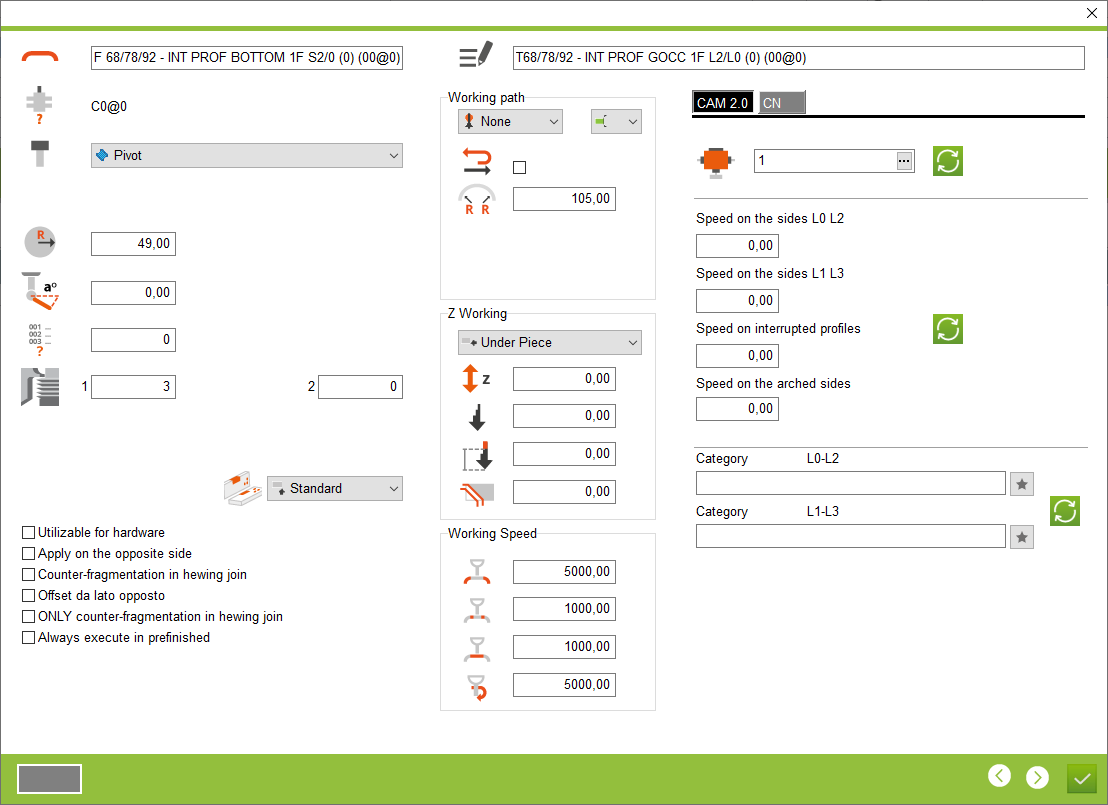


18. Offset Z - Offset of tool relative to Z entered in tool definition
19. Z incremental - Note: Only for drill or end mill. Setting the incremental value for Z when drilling or end milling
20. Stretch to which the incremental working is applied - Value by which the tool input is skipped as an incremental (E.g. if there is no material for the first 10mm and we do not want the tool to go incrementally down to this value, so we can skip this value)
21. Incremental value for raw material - Place where you enter the value for how many millimetres you want to remove the raw material
22. In/Out speed - Tool input and output speed
23. Counter-fragmentation speed - Speed anti material break-out
24. Feed speed - Feed speed in the material
25. Rotation speed
26. CN - Tab with special CN codes for workings
27. Spindle selection area
28. Speed on sides L2-L0 - Speed entry space on long side profiles
29. Speed on sides L1-L3 - Speed entry space on ends side profiles
30. Speed on interruped profile - Work speed for anti material break-out
31. Speed on the arched sides - Speed entry space on arched profiles
32. Category on sides L0-L2 - The place for choose a category on long profile
33. Category on sides L1-L3 - The place for choose a category on ends profile
34. Update - Button for updating the changes made. Note: Wherever this working will exist, it will be updated
19. Z incremental - Note: Only for drill or end mill. Setting the incremental value for Z when drilling or end milling
20. Stretch to which the incremental working is applied - Value by which the tool input is skipped as an incremental (E.g. if there is no material for the first 10mm and we do not want the tool to go incrementally down to this value, so we can skip this value)
21. Incremental value for raw material - Place where you enter the value for how many millimetres you want to remove the raw material
22. In/Out speed - Tool input and output speed
23. Counter-fragmentation speed - Speed anti material break-out
24. Feed speed - Feed speed in the material
25. Rotation speed
26. CN - Tab with special CN codes for workings
27. Spindle selection area
28. Speed on sides L2-L0 - Speed entry space on long side profiles
29. Speed on sides L1-L3 - Speed entry space on ends side profiles
30. Speed on interruped profile - Work speed for anti material break-out
31. Speed on the arched sides - Speed entry space on arched profiles
32. Category on sides L0-L2 - The place for choose a category on long profile
33. Category on sides L1-L3 - The place for choose a category on ends profile
34. Update - Button for updating the changes made. Note: Wherever this working will exist, it will be updated
This is the place in the program where the user can configure the working, which is then applied to the individual profile logics.


