


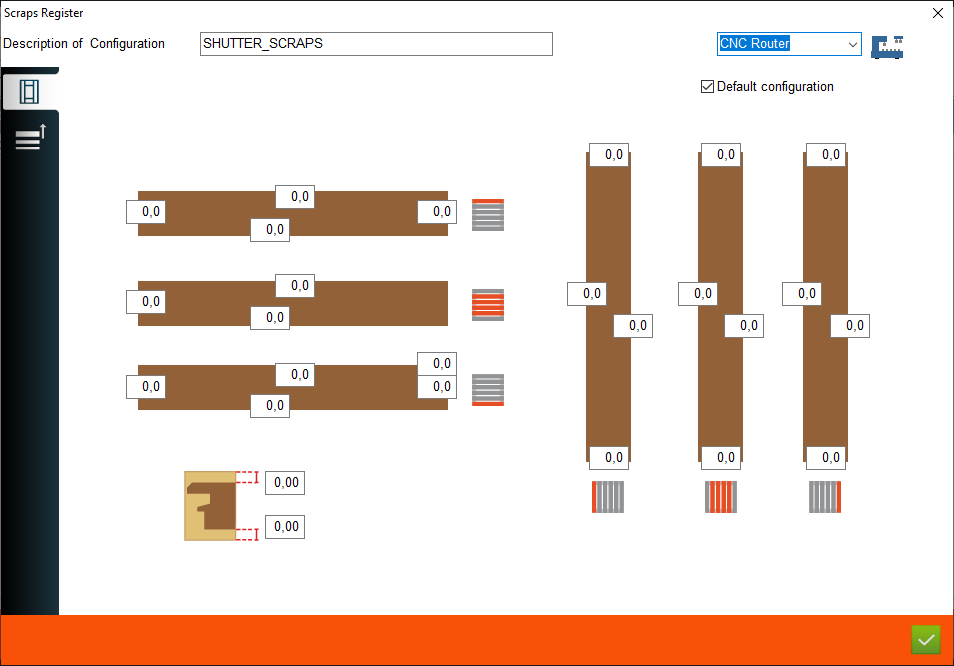


1. Description of configuration - This is where user enter the name of the configuration
2. Machine phase - This is a place where user choose the machine phase for using scraps configuration
3. Default configuration - This is where the user can select a configuration as the default. If selected, all shutter configurations use this scraps configuration
4. Scraps for external elements - This is a place where user set scraps for external elements
5. Scraps configuration for other elements - This is a place where user set scraps for other elements
6. Scraps for top elements - This is a place where user set scraps for top elements the same as we have on picture
7. Scraps for central elements - This is a place where user set scraps for central elements the same as we have on picture
2. Machine phase - This is a place where user choose the machine phase for using scraps configuration
3. Default configuration - This is where the user can select a configuration as the default. If selected, all shutter configurations use this scraps configuration
4. Scraps for external elements - This is a place where user set scraps for external elements
5. Scraps configuration for other elements - This is a place where user set scraps for other elements
6. Scraps for top elements - This is a place where user set scraps for top elements the same as we have on picture
7. Scraps for central elements - This is a place where user set scraps for central elements the same as we have on picture
8. Scraps for bottom elements - This is a place where user set scraps for bottom elements the same as we have on picture
9. Scraps for all elements on thickness from top - This is a place where user set scraps for all elements the same as we have on picture
10. Scraps for all elements on thickness from bottom - This is a place where user set scraps for all elements the same as we have on picture
11. Scraps for left elements - This is a place where user set scraps for left elements the same as we have on picture
12. Scraps for central elements - This is a place where user set scraps for central elements the same as we have on picture
13. Scraps for right elements - This is a place where user set scraps for right elements the same as we have on picture
9. Scraps for all elements on thickness from top - This is a place where user set scraps for all elements the same as we have on picture
10. Scraps for all elements on thickness from bottom - This is a place where user set scraps for all elements the same as we have on picture
11. Scraps for left elements - This is a place where user set scraps for left elements the same as we have on picture
12. Scraps for central elements - This is a place where user set scraps for central elements the same as we have on picture
13. Scraps for right elements - This is a place where user set scraps for right elements the same as we have on picture
This is the place in the program where the user can add or edit scraps configuration for shutter elements


