


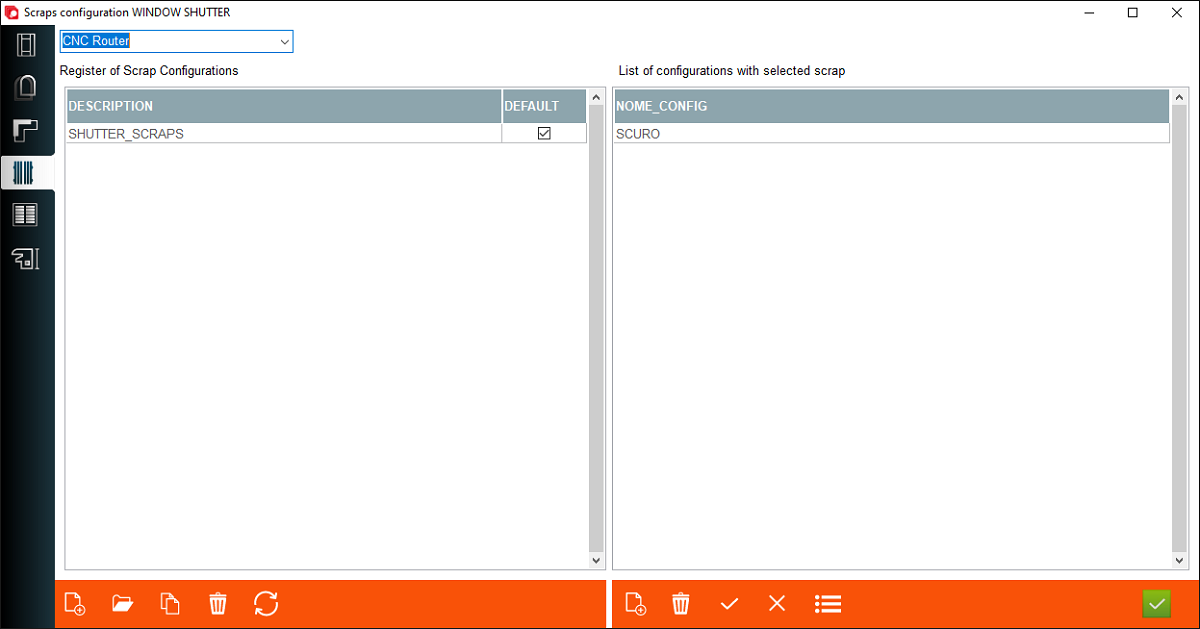


1. Frame scraps configuration - This is a place where user can create or edit a scraps configuration for frame
2. Sash scraps configuration - This is a place where user can create or edit a scraps configuration for sash
3. Mould scraps configuration - This is a place where user can create or edit a scraps configuration for mould
4. Shutter scraps configuration - This is a place where user can create or edit a scraps configuration for shutter
5. Blind scraps configuration - This is a place where user can create or edit a scraps configuration for blind
6. Perimeter accesories scraps configuration - This is a place where user can create or edit a scraps configuration for perimeter accesories
2. Sash scraps configuration - This is a place where user can create or edit a scraps configuration for sash
3. Mould scraps configuration - This is a place where user can create or edit a scraps configuration for mould
4. Shutter scraps configuration - This is a place where user can create or edit a scraps configuration for shutter
5. Blind scraps configuration - This is a place where user can create or edit a scraps configuration for blind
6. Perimeter accesories scraps configuration - This is a place where user can create or edit a scraps configuration for perimeter accesories
7. Machine phase - A place where user choose machine phase for scraps configuration
8. Create new - If user click on button archimede create a new scraps configuration
9. Open - If user click on button archimede open a choosen scraps configuration
10. Description - Name of scrap configuration
11. Default - if checked, the program uses this configuration for all frame configurations, it does not select only for those configurations that have a different configuration defined
12. Nome config - This is a place where user can add a name of configuration if that configuration doesn't be default
13. Add configuration - This is a place where user can create a new position for add a frame configuration using this scraps configuration
8. Create new - If user click on button archimede create a new scraps configuration
9. Open - If user click on button archimede open a choosen scraps configuration
10. Description - Name of scrap configuration
11. Default - if checked, the program uses this configuration for all frame configurations, it does not select only for those configurations that have a different configuration defined
12. Nome config - This is a place where user can add a name of configuration if that configuration doesn't be default
13. Add configuration - This is a place where user can create a new position for add a frame configuration using this scraps configuration
This is the place in the program where the user can add or edit scraps configuration


