14. A place for entry of the maximum tool radius, the value must be in agreement with the tool drawing
15. Maximum useful tool length only for end mills or drills
16. Tool calibration length in the Z axis, the value from which we will base workings
17. Maximum radius of the holding part
18. Distance from the end of the tool to the beginning of the aggregate
19. Tool length projecting from the aggregate
20. Tool azimuth angle
21. Enter only for drill tools, pilot length
22. Largest width of aggregate or tool measured to centre of hole
23. The special cn code for the tools is only entered by kosmosoft technicians
24. Select the option used for hardware, only for tools that are to be used for hardware, other options are used only in special situations
25. Open tool drawing
26. Delete tool drawing
27. Drawing preview



1. Place where user enter the name of the tool. Note: for some machines the name must be the same as in the tool register in the machine software
2. Place where user enter the free description of the tool
3. Choose type of tool - Place to choose the type of tool depending on the type of work like a blade, vertical or horizontal
4. CN tool code - CN code for the tool. Here, indicate the position of the tool as it is in the tool register in the machine software
5. Total tool length, the value must be in agreement with the tool drawing
6. Choice of clockwise or counterclockwise rotation of the tool
7. Safty distance in Z axis abouth table device
8. Choice of tool type: mill or drill. If you do not select a tool type, in some cases the program may not allow you to proceed further in this case you should select the correct type
9. Horizontal spindle length
10. Maximum lenght of the holding part
11. Tool length measured from end of tool to centre of aggregate
12. Spindle selection, make sure which spindle you want the tool to work on
13. Tool groups, in the case of several machines it is possible for one tool to be grouped in different groups, these groups must then be created as separate tools and assigned a separator
2. Place where user enter the free description of the tool
3. Choose type of tool - Place to choose the type of tool depending on the type of work like a blade, vertical or horizontal
4. CN tool code - CN code for the tool. Here, indicate the position of the tool as it is in the tool register in the machine software
5. Total tool length, the value must be in agreement with the tool drawing
6. Choice of clockwise or counterclockwise rotation of the tool
7. Safty distance in Z axis abouth table device
8. Choice of tool type: mill or drill. If you do not select a tool type, in some cases the program may not allow you to proceed further in this case you should select the correct type
9. Horizontal spindle length
10. Maximum lenght of the holding part
11. Tool length measured from end of tool to centre of aggregate
12. Spindle selection, make sure which spindle you want the tool to work on
13. Tool groups, in the case of several machines it is possible for one tool to be grouped in different groups, these groups must then be created as separate tools and assigned a separator
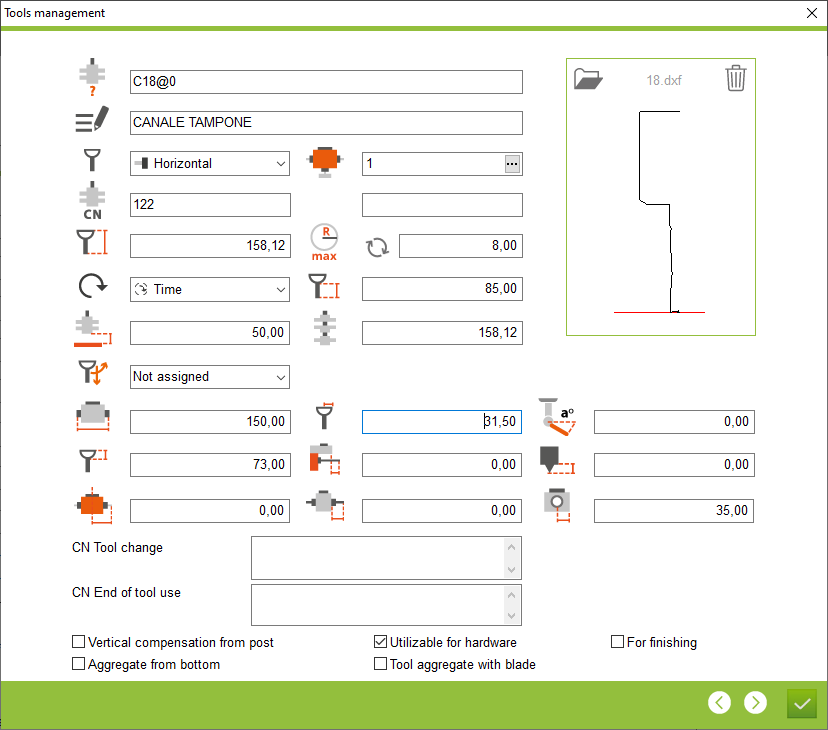


This is the place in the program where the user defines the parameters of a tool and then the workings are created for that tool.


