


1. Profile logic - This is the place in program where user add milling for profile logic for more information check profile logics
2. Connection type - This is the place in program where user choose the typ of connection (Linear joint, Arc joint, 45 degrees smooth)
3. Exit onto - The place where the user defines the output of the tool to which the profile
4. Radius arc joint - This is the place where the user sets the arc joint value
2. Connection type - This is the place in program where user choose the typ of connection (Linear joint, Arc joint, 45 degrees smooth)
3. Exit onto - The place where the user defines the output of the tool to which the profile
4. Radius arc joint - This is the place where the user sets the arc joint value
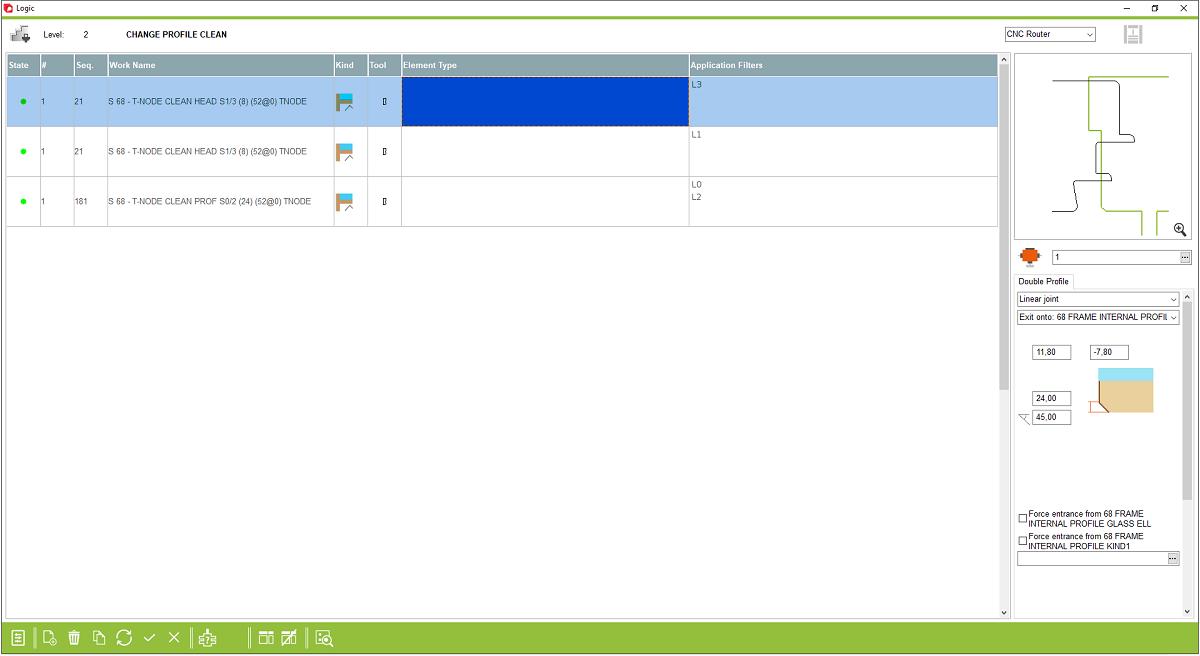
5. Offset - This is a offset value of the tool
6. Distance from profile - This is a value distance from profile where the tool must go out of the profile
7. Angle - This is a value of angle where tool going out of the profile
8. Force enterance from - This is a place in program where user can force enterance from profile
6. Distance from profile - This is a value distance from profile where the tool must go out of the profile
7. Angle - This is a value of angle where tool going out of the profile
8. Force enterance from - This is a place in program where user can force enterance from profile
This is the place in the program where the user can set the tool using for change profile in ends. The workings was from profile logics and if workings must be using on change profiling on profile logics that working must be turn off. In this case workings using on change profile was loaded from this page of program


