


1. Name - Name of double profile configuration
2. Description - Description of double profile configuration
3. Choose frame profile - This is the place in the program where the user selects the frame profile to be changed
4. Choose glass profile - This is the place in the program where the user selects the glass profile to be changed
5. Open logics on ends - This is a place in program where user can set the millings on ends
6. Open accessory logic on ends - This is a place in program where user can set the workings for change profile on ends
2. Description - Description of double profile configuration
3. Choose frame profile - This is the place in the program where the user selects the frame profile to be changed
4. Choose glass profile - This is the place in the program where the user selects the glass profile to be changed
5. Open logics on ends - This is a place in program where user can set the millings on ends
6. Open accessory logic on ends - This is a place in program where user can set the workings for change profile on ends
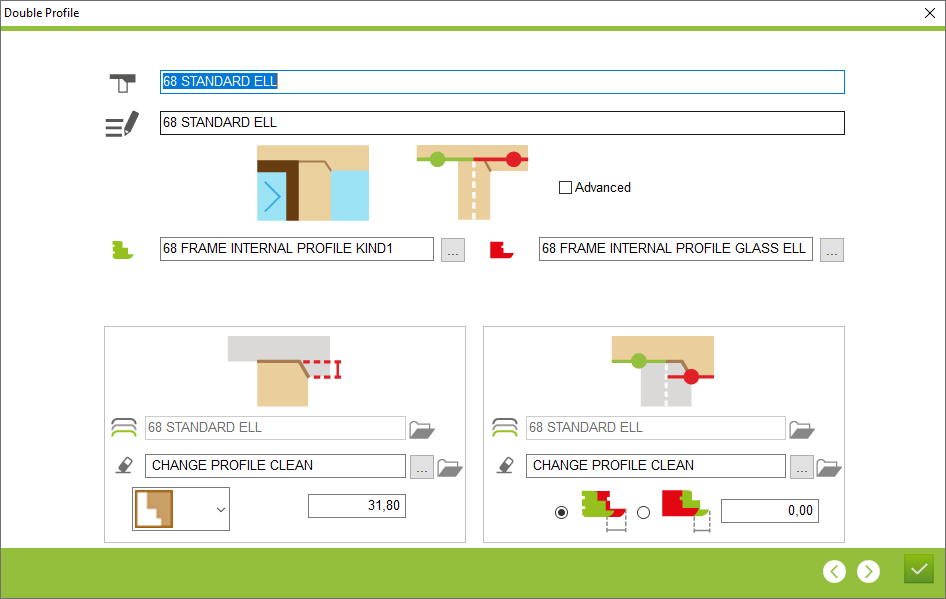
7. Open logics on long profile - This is a place in program where user can set the millings on long profile
8. Open accessory logic on long profile - This is a place in program where user can set the workings for change profile on long profile
9. Junctions type - A place where user choose type of junctions for central element
10. Overlap - A place where user set the value of overlaping
11. Profile width - The place in the program where the user specifies which profile is wider (glass or frame)
12. Difference value of the wider profile - The place in the program where the user defines the width differences of a variable profile
8. Open accessory logic on long profile - This is a place in program where user can set the workings for change profile on long profile
9. Junctions type - A place where user choose type of junctions for central element
10. Overlap - A place where user set the value of overlaping
11. Profile width - The place in the program where the user specifies which profile is wider (glass or frame)
12. Difference value of the wider profile - The place in the program where the user defines the width differences of a variable profile
This is the place in the program where the user can create and edit a double profile configuration


