




1. Name of configuration - A place for the user to enter a configuration name
2. Description of configuration - A place for the user to enter a configuration description
3. Type of window - A place to set the type of window (for example: normal, sliding sash or HS portal)
4. Definition of element - This is the place in the program where sections and thickness are defined for each sash element
5. Junctions - A place to choose type of junction for elements
6. Central elements - This is the place in the program where sections and thickness are definied for central sash elements
2. Description of configuration - A place for the user to enter a configuration description
3. Type of window - A place to set the type of window (for example: normal, sliding sash or HS portal)
4. Definition of element - This is the place in the program where sections and thickness are defined for each sash element
5. Junctions - A place to choose type of junction for elements
6. Central elements - This is the place in the program where sections and thickness are definied for central sash elements
7. Applied transom - A place to set thickness and section for applied transom elements
8. Matchboard - configuration of matchboard
9. Configuration profile aplication - A place to set profile aplication for that configuration
10. Options - A place to set other option for that configuration
11. CAD - A place to set the options for section CAD
12. CAM - A place to set the options for section CAM
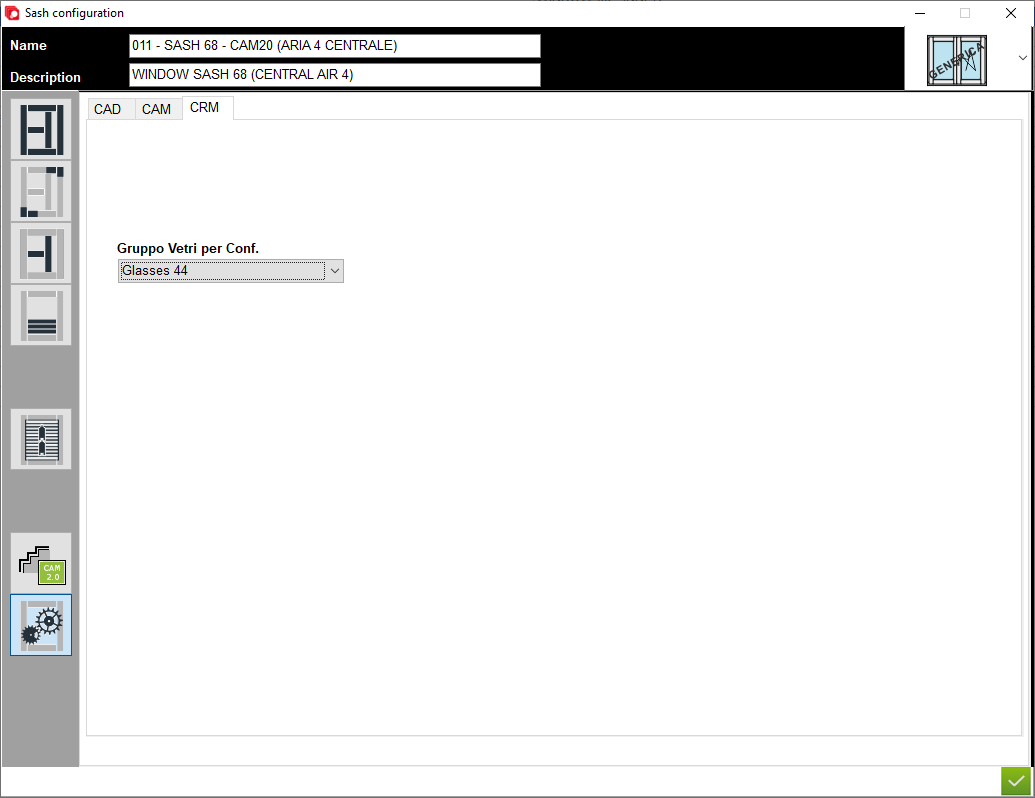
13. Gruppo Verti per Conf. - This is the place in the program that allows you to assign a default glass group, when designing the program will only filter the glass group that has been assigned
8. Matchboard - configuration of matchboard
9. Configuration profile aplication - A place to set profile aplication for that configuration
10. Options - A place to set other option for that configuration
11. CAD - A place to set the options for section CAD
12. CAM - A place to set the options for section CAM
13. Gruppo Verti per Conf. - This is the place in the program that allows you to assign a default glass group, when designing the program will only filter the glass group that has been assigned


This is the place in the program where the user defines the options using for module CRM to filter that structure


