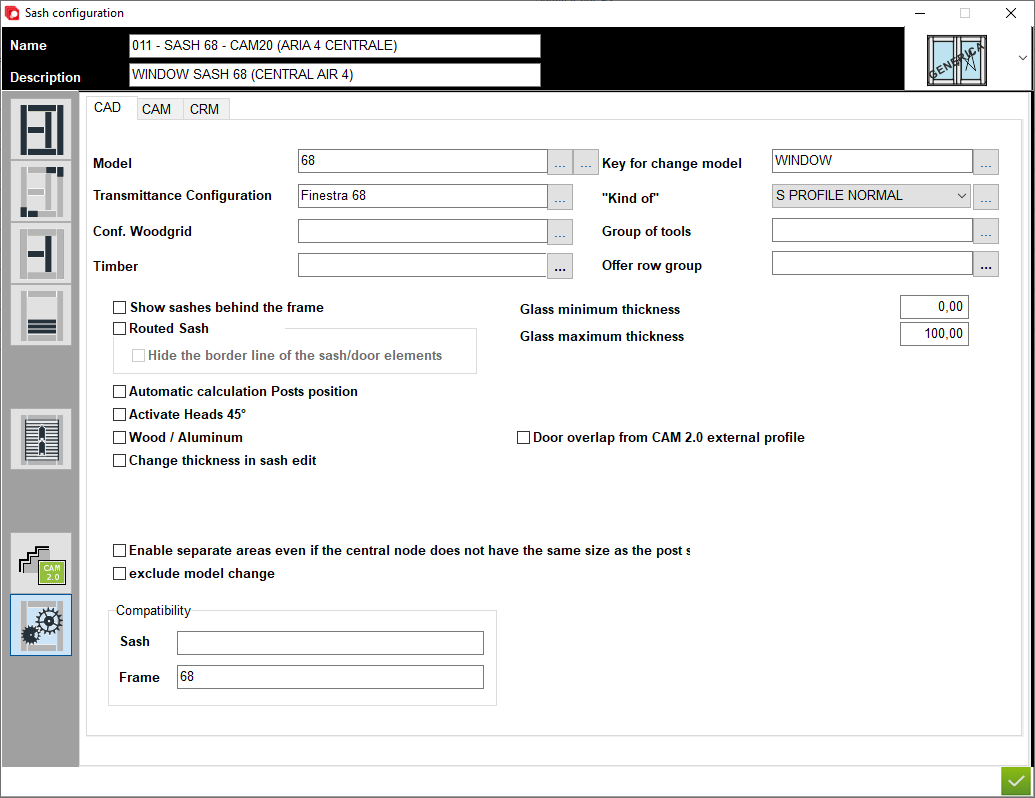


1. Name of configuration - A place for the user to enter a configuration name
2. Description of configuration - A place for the user to enter a configuration description
3. Type of window - A place to set the type of window (for example: normal, sliding sash or HS portal)
4. Definition of element - This is the place in the program where sections and thickness are defined for each sash element
5. Junctions - A place to choose type of junction for elements
6. Central elements - This is the place in the program where sections and thickness are definied for central sash elements
7. Applied transom - A place to set thickness and section for applied transom elements
8. Matchboard - configuration of matchboard
9. Configuration profile aplication - A place to set profile aplication for that configuration
10. Options - A place to set other option for that configuration
11. CAM - A place to set the options for section CAM
12. CRM - A place to set the options for section CRM
13. Model - Place where we can assign a default model for the selected configuration
14. Transmittance Configuration - Place to assign the thermal transmittance configuration for the selected configuration
15. Conf. Woodgrid - A place to assign the woodgrid configuration
16. Timber - The user can assign a default timber for this configuration
17. Key for change model - User assigns key to change model
18. Kind of - The user assigns a default "kind of"
19. Group of tool - This is a place for set the group of tool using in that configuration. This option is used only for some machines
2. Description of configuration - A place for the user to enter a configuration description
3. Type of window - A place to set the type of window (for example: normal, sliding sash or HS portal)
4. Definition of element - This is the place in the program where sections and thickness are defined for each sash element
5. Junctions - A place to choose type of junction for elements
6. Central elements - This is the place in the program where sections and thickness are definied for central sash elements
7. Applied transom - A place to set thickness and section for applied transom elements
8. Matchboard - configuration of matchboard
9. Configuration profile aplication - A place to set profile aplication for that configuration
10. Options - A place to set other option for that configuration
11. CAM - A place to set the options for section CAM
12. CRM - A place to set the options for section CRM
13. Model - Place where we can assign a default model for the selected configuration
14. Transmittance Configuration - Place to assign the thermal transmittance configuration for the selected configuration
15. Conf. Woodgrid - A place to assign the woodgrid configuration
16. Timber - The user can assign a default timber for this configuration
17. Key for change model - User assigns key to change model
18. Kind of - The user assigns a default "kind of"
19. Group of tool - This is a place for set the group of tool using in that configuration. This option is used only for some machines
20. Offer row group - This is a place to set group for CRM module to have more option for filter of material using in this structure etc.
21. Show sashes behind the frame - This is option to show sashes behind the sashses if sash is covered by frame
22. Routed Sash - Select if pantographed sash
23. Hide the border line of the sash / door elements - This is option for showing or hiding connection lines in the design window
24. Glass minimum thickness - This is the place to define the minimum glass thickness for a structure and in the glass selection list it only filters the glass in this range
25. Glass maximum thickness - This is the place to define the maximum glass thickness for a structure and in the glass selection list it only filters the glass in this range
26. Wood / Aluminium - Select if must be used for sash wood aluminum
27. Change thickness in sash edit - That option must be checked if user want to edit thickness of sash when designed a window
28. Door overlap from CAM 2.0 external profile - If checked, the sash overlap is selected from the external profile
29. Enable separate areas even if the central node does not have the same size as the post section - If internal frame profile filtering is selected, it is possible to filter the profiles in relation to the external sash profile
30. Exclude model change - If selected it is possible to set the model change in register
31. Compatibility sash - Space for specifying the compatibility of the sash in relation to the frame; if the same compatibility is specified in the frame and the sash, the programme allows you to filter the insertion of only those sashes that can be used in this frame configuration
32. Space for specifying the compatibility of the sash in sash relation to the sash, if the same compatibility is specified for the first sash and the second sash, the programme allows you to filter the insertion of only those sashes that can be used in this sash in sash configuration
21. Show sashes behind the frame - This is option to show sashes behind the sashses if sash is covered by frame
22. Routed Sash - Select if pantographed sash
23. Hide the border line of the sash / door elements - This is option for showing or hiding connection lines in the design window
24. Glass minimum thickness - This is the place to define the minimum glass thickness for a structure and in the glass selection list it only filters the glass in this range
25. Glass maximum thickness - This is the place to define the maximum glass thickness for a structure and in the glass selection list it only filters the glass in this range
26. Wood / Aluminium - Select if must be used for sash wood aluminum
27. Change thickness in sash edit - That option must be checked if user want to edit thickness of sash when designed a window
28. Door overlap from CAM 2.0 external profile - If checked, the sash overlap is selected from the external profile
29. Enable separate areas even if the central node does not have the same size as the post section - If internal frame profile filtering is selected, it is possible to filter the profiles in relation to the external sash profile
30. Exclude model change - If selected it is possible to set the model change in register
31. Compatibility sash - Space for specifying the compatibility of the sash in relation to the frame; if the same compatibility is specified in the frame and the sash, the programme allows you to filter the insertion of only those sashes that can be used in this frame configuration
32. Space for specifying the compatibility of the sash in sash relation to the sash, if the same compatibility is specified for the first sash and the second sash, the programme allows you to filter the insertion of only those sashes that can be used in this sash in sash configuration


This is the place in the program where the user defines the options for module CAD to design the window