




1. Name of configuration
2. Description of configuration
3. Definition of elements - A place to set thickness and section for construction elements
4. Junctions - A place to choose type of junction for elements
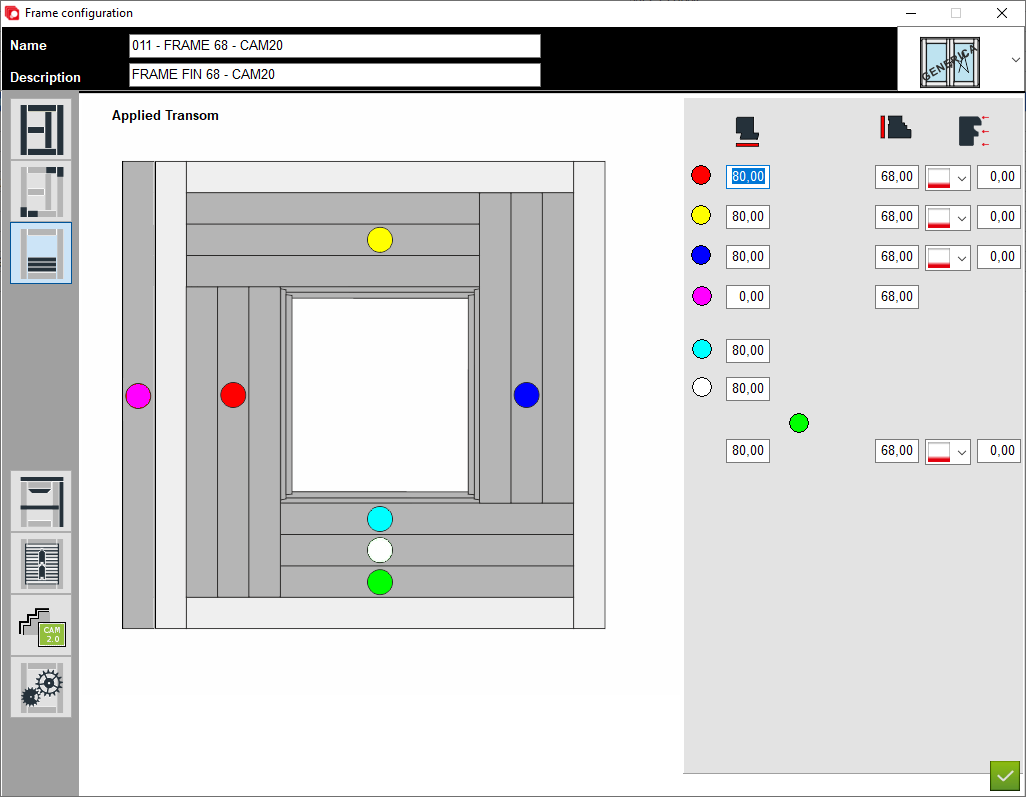
5. Applied transom - A place to set thickness and section for applied transom elements
6. Custom elements - A place to add custom elements to the construction
7. Matchboard - configuration of matchboard
8. Configuration profile aplication - A place to set profile aplication for that configuration
9. Options - A place to set other option for that configuration
10. Type of window - A place to set the type of window (for example: normal, sliding sash or HS portal)
2. Description of configuration
3. Definition of elements - A place to set thickness and section for construction elements
4. Junctions - A place to choose type of junction for elements
5. Applied transom - A place to set thickness and section for applied transom elements
6. Custom elements - A place to add custom elements to the construction
7. Matchboard - configuration of matchboard
8. Configuration profile aplication - A place to set profile aplication for that configuration
9. Options - A place to set other option for that configuration
10. Type of window - A place to set the type of window (for example: normal, sliding sash or HS portal)
11. Section - The areas below should be completed depending on the cross-section of the individual elements marked in colour
12. Thickness - The areas below should be completed depending on the thickness of the individual elements marked in colour
13. Offset Z - The Z-axis position of the bottom sill relative to the whole structure positive value moves toward the inside of the house
14. Red colour - Left applied transom
15. Yellow colour - Top applied transom
16. Blue colour - Right applied transom
17. Purple colour - External applied transom
18. Cyan colour - Last applied transom
19. White colour - Central applied transom
20. Green - First applied transom
12. Thickness - The areas below should be completed depending on the thickness of the individual elements marked in colour
13. Offset Z - The Z-axis position of the bottom sill relative to the whole structure positive value moves toward the inside of the house
14. Red colour - Left applied transom
15. Yellow colour - Top applied transom
16. Blue colour - Right applied transom
17. Purple colour - External applied transom
18. Cyan colour - Last applied transom
19. White colour - Central applied transom
20. Green - First applied transom


This is the place in the program where the user defines the sections and thicknesses for the applied transom element


