


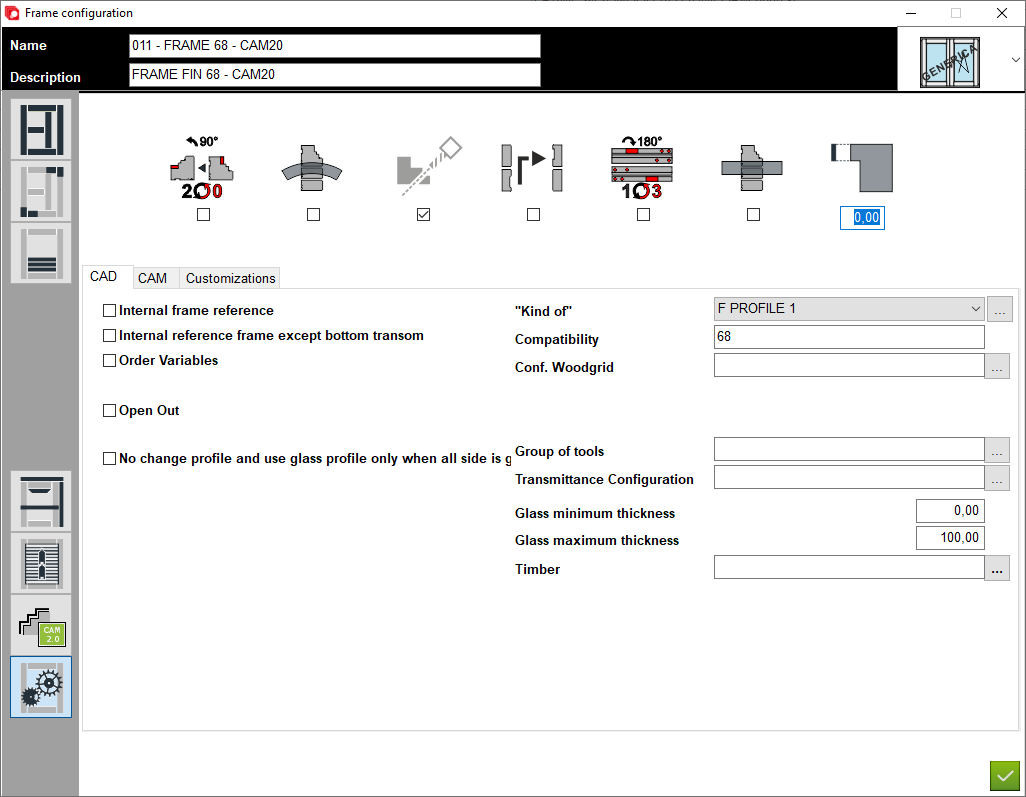


1. Name of configuration
2. Description of configuration
3. Definition of elements - A place to set thickness and section for construction elements
4. Junctions - A place to choose type of junction for elements
5. Applied transom - A place to set thickness and section for applied transom elements
6. Custom elements - A place to add custom elements to the construction
7. Matchboard - configuration of matchboard
8. Configuration profile aplication - A place to set profile aplication for that configuration
9. Options - A place to set other option for that configuration
10. Type of window - A place to set the type of window (for example: normal, sliding sash or HS portal)
11. Workings tip over - Swap the section with the thickness of the element
12. Make hole for waterdrip - If checked the user can add a waterdrip configuration
2. Description of configuration
3. Definition of elements - A place to set thickness and section for construction elements
4. Junctions - A place to choose type of junction for elements
5. Applied transom - A place to set thickness and section for applied transom elements
6. Custom elements - A place to add custom elements to the construction
7. Matchboard - configuration of matchboard
8. Configuration profile aplication - A place to set profile aplication for that configuration
9. Options - A place to set other option for that configuration
10. Type of window - A place to set the type of window (for example: normal, sliding sash or HS portal)
11. Workings tip over - Swap the section with the thickness of the element
12. Make hole for waterdrip - If checked the user can add a waterdrip configuration
13. Devide sliding frame in thickness - If marked divides the frame into a few pieces in order to make it thicker on the machine
14. Overturn workings by 180 degrees - Rotate workings 180 degrees (swaps side L1 with side L3)
15. CAM - A place to set the options for section CAM in configuration
16. Open out - If the configuration is to be used for outward opening, the option must be checked
17. Kind of - Place to select the typology that will automatically be selected as the default one
18. Compatibility - A place to enter compatibility, which will select those sashes that will have the same compatibility
19. Transmittance configuration - A place to enter transmittance configuration that will automatically be selected as the default one
20. Glass minimum and maximum thickness - A place to enter the minimum and maximum glass thickness
21. Timber - A place to enter timber that will automatically be selected as the default one
14. Overturn workings by 180 degrees - Rotate workings 180 degrees (swaps side L1 with side L3)
15. CAM - A place to set the options for section CAM in configuration
16. Open out - If the configuration is to be used for outward opening, the option must be checked
17. Kind of - Place to select the typology that will automatically be selected as the default one
18. Compatibility - A place to enter compatibility, which will select those sashes that will have the same compatibility
19. Transmittance configuration - A place to enter transmittance configuration that will automatically be selected as the default one
20. Glass minimum and maximum thickness - A place to enter the minimum and maximum glass thickness
21. Timber - A place to enter timber that will automatically be selected as the default one


This is the place in the program where the user defines special settings for the configuration


