




1. Name of configuration
2. Description of configuration
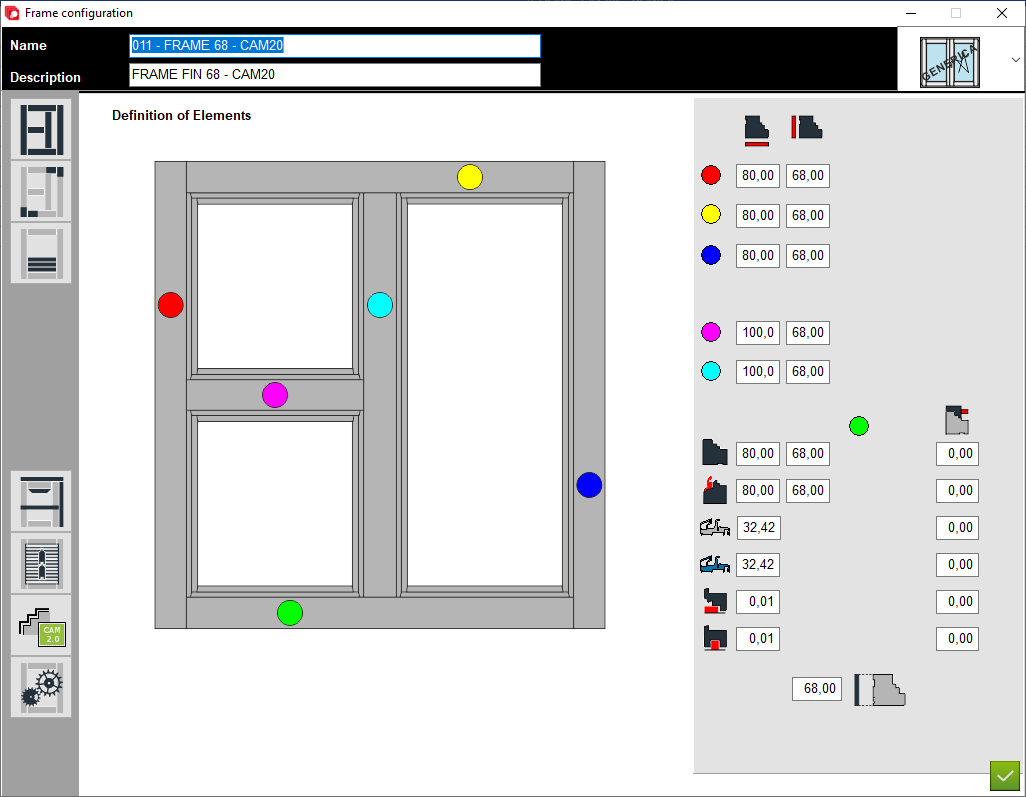
3. Definition of elements - A place to set thickness and section for construction elements
4. Junctions - A place to choose type of junction for elements
5. Applied transom - A place to set thickness and section for applied transom elements
6. Custom elements - A place to add custom elements to the construction
7. Matchboard - configuration of matchboard
8. Configuration profile aplication - A place to set profile aplication for that configuration
9. Options - A place to set other option for that configuration
10. Type of window - A place to set the type of window (for example: normal, sliding sash or HS portal)
11. Section - The areas below should be completed depending on the cross-section of the individual elements marked in colour
2. Description of configuration
3. Definition of elements - A place to set thickness and section for construction elements
4. Junctions - A place to choose type of junction for elements
5. Applied transom - A place to set thickness and section for applied transom elements
6. Custom elements - A place to add custom elements to the construction
7. Matchboard - configuration of matchboard
8. Configuration profile aplication - A place to set profile aplication for that configuration
9. Options - A place to set other option for that configuration
10. Type of window - A place to set the type of window (for example: normal, sliding sash or HS portal)
11. Section - The areas below should be completed depending on the cross-section of the individual elements marked in colour
12. Thickness - The areas below should be completed depending on the thickness of the individual elements marked in colour
13. Colours - The colours in the image on the left show for which element the section and thickness are to be set (for example: Red colour is a left element of structure and yelow is a top element of structure)
14. Wooden sill - Place of insertion section and thickness of the wooden sill
15. Water drip sill - Place of insertion section and thickness of the water drip sill
16. Aluminium sill - Place of insertion section and thickness of the aluminium sill
17. Second Aluminium sill - Place of insertion section and thickness of the second aluminium sill
18. Marble sill - Place of insertion section and thickness of the marble sill
19. Coldscreen sill - Place of insertion section and thickness of the coldscreen sill
20. Refernece thickness of configuration - A place to set the refference thickness of configuration
21. Offset Z - The Z-axis position of the bottom sill relative to the whole structure positive value moves toward the inside of the house
13. Colours - The colours in the image on the left show for which element the section and thickness are to be set (for example: Red colour is a left element of structure and yelow is a top element of structure)
14. Wooden sill - Place of insertion section and thickness of the wooden sill
15. Water drip sill - Place of insertion section and thickness of the water drip sill
16. Aluminium sill - Place of insertion section and thickness of the aluminium sill
17. Second Aluminium sill - Place of insertion section and thickness of the second aluminium sill
18. Marble sill - Place of insertion section and thickness of the marble sill
19. Coldscreen sill - Place of insertion section and thickness of the coldscreen sill
20. Refernece thickness of configuration - A place to set the refference thickness of configuration
21. Offset Z - The Z-axis position of the bottom sill relative to the whole structure positive value moves toward the inside of the house


This is the place in the program where the user defines the sections and thicknesses for the external and internal parts of the structure


