


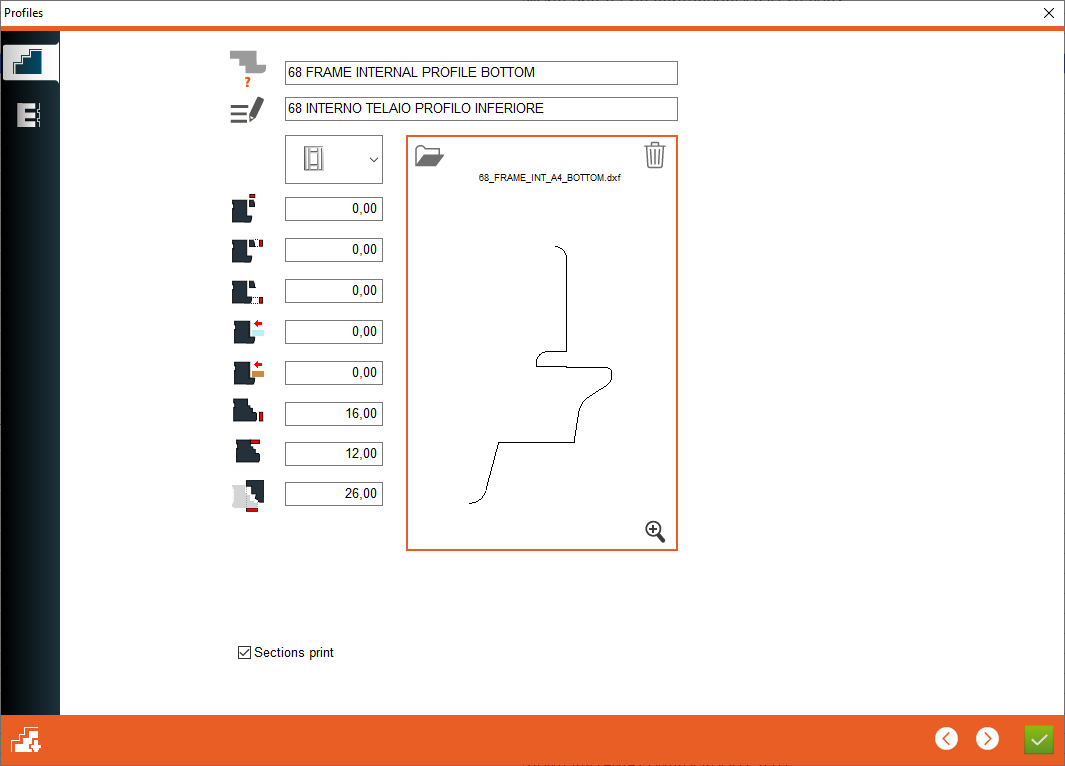


1. Profile name - Enter the profile name
2. Profile description - Enter profile description
3. Profile type - Select profile type, the currently selected profile is the internal profile of frame, which enables you to enter the values for this profile type below
4. Stop glas band section - Entering the section values of the glazing bead
5. Stop glass band thickness - The value is given if the glazing bead is to be of a "fixed" thickness without the possibility of changing it according to the thickness of the glass
6. Fixed stop glass band thickness - Value for the thickness of the fixed glazing bead
7. Increase glass place - The value by which the glass has to be extended to be calculated correctly for this profile
8. Increase glass place - The value by which the glass has to be extended to be calculated correctly for this profile
2. Profile description - Enter profile description
3. Profile type - Select profile type, the currently selected profile is the internal profile of frame, which enables you to enter the values for this profile type below
4. Stop glas band section - Entering the section values of the glazing bead
5. Stop glass band thickness - The value is given if the glazing bead is to be of a "fixed" thickness without the possibility of changing it according to the thickness of the glass
6. Fixed stop glass band thickness - Value for the thickness of the fixed glazing bead
7. Increase glass place - The value by which the glass has to be extended to be calculated correctly for this profile
8. Increase glass place - The value by which the glass has to be extended to be calculated correctly for this profile


9. Rebate thickness - Entering the thickness of the rebate
10. Rebate size - Entering the size of the rebate
11. Overlap for sash - Add the overlap of the sash on the frame
12. Open Logic - Opens the profile logic window with the possibility of editing filtering tool choice
13. Counter profile button - This button is used to open the windows for entering the counterprofile value
14. Open a drawing - Select profile drawing
15. Delete a drawing
16. Show drawing - Opens drawing preview
10. Rebate size - Entering the size of the rebate
11. Overlap for sash - Add the overlap of the sash on the frame
12. Open Logic - Opens the profile logic window with the possibility of editing filtering tool choice
13. Counter profile button - This button is used to open the windows for entering the counterprofile value
14. Open a drawing - Select profile drawing
15. Delete a drawing
16. Show drawing - Opens drawing preview


This is the place in the program where the user defines the profile values


