

1. Name of configuration
2. Description of configuration
3. Definition of elements - A place to set thickness and section for construction elements
4. Junctions - A place to choose type of junction for elements
5. Applied transom - A place to set thickness and section for applied transom elements
6. Custom elements - A place to add custom elements to the construction
7. Matchboard - configuration of matchboard
8. Configuration profile aplication - A place to set profile aplication for that configuration
9. Options - A place to set other option for that configuration
10. Type of window - A place to set the type of window (for example: normal, sliding sash or HS portal)
11. Workings tip over - Swap the section with the thickness of the element
12. Make hole for waterdrip - If checked the user can add a waterdrip configuration
2. Description of configuration
3. Definition of elements - A place to set thickness and section for construction elements
4. Junctions - A place to choose type of junction for elements
5. Applied transom - A place to set thickness and section for applied transom elements
6. Custom elements - A place to add custom elements to the construction
7. Matchboard - configuration of matchboard
8. Configuration profile aplication - A place to set profile aplication for that configuration
9. Options - A place to set other option for that configuration
10. Type of window - A place to set the type of window (for example: normal, sliding sash or HS portal)
11. Workings tip over - Swap the section with the thickness of the element
12. Make hole for waterdrip - If checked the user can add a waterdrip configuration
13. Devide sliding frame in thickness - If marked divides the frame into a few pieces in order to make it thicker on the machine
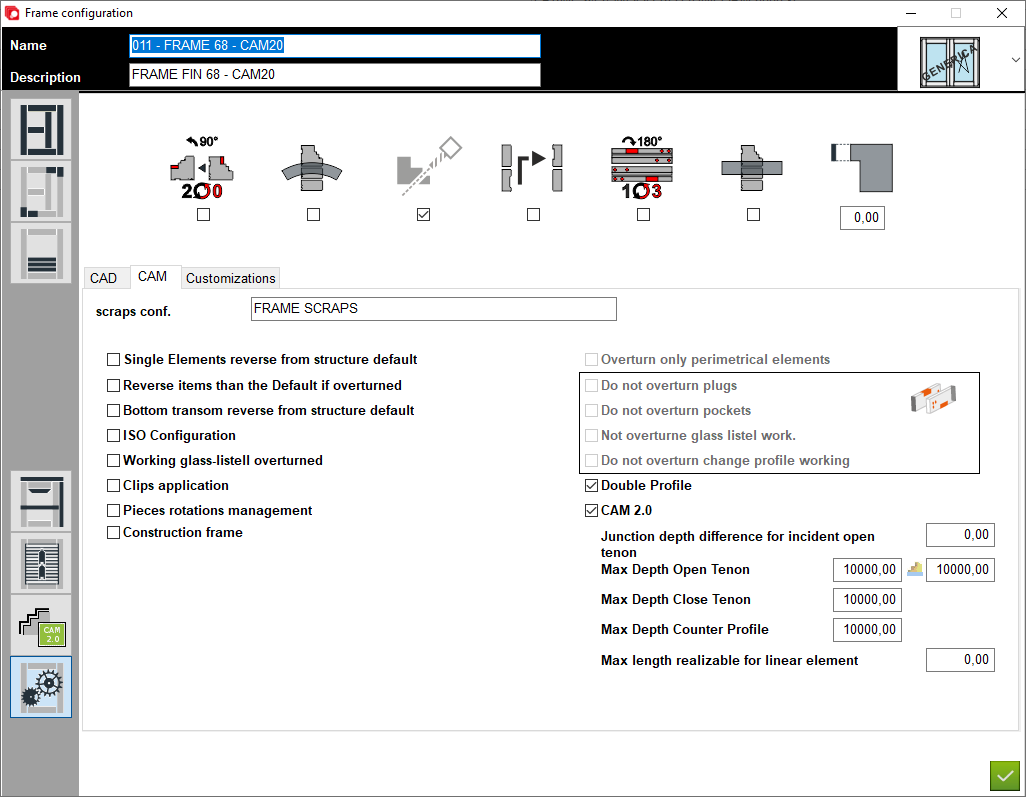
14. Overturn workings by 180 degrees - Rotate workings 180 degrees (swaps side L1 with side L3)
15. CAD - A place to set the options for section CAD in configuration
16. Scraps configuration - The user can assign a scraps configuration for this configuration. If not assigned, the programe will automatically select a default configuration.
17. Additional options - These options are dedicated to special types of configurations, which the user selects when they need to be used
18. Overturn managment - Allows management of the overturned option depending on the selected option. These options are available when the item overturned option is selected
19. Double profile - The user selects this option if the configuration is to change from sash profile to fixed glass profile
20. CAM 2.0 - This option must be selected if you are using the configuration in CAM 2.0
21. Junctions depth - This is the place in the program that allows you to define the maximum length of the connection (by default we do not change the parameters)
14. Overturn workings by 180 degrees - Rotate workings 180 degrees (swaps side L1 with side L3)
15. CAD - A place to set the options for section CAD in configuration
16. Scraps configuration - The user can assign a scraps configuration for this configuration. If not assigned, the programe will automatically select a default configuration.
17. Additional options - These options are dedicated to special types of configurations, which the user selects when they need to be used
18. Overturn managment - Allows management of the overturned option depending on the selected option. These options are available when the item overturned option is selected
19. Double profile - The user selects this option if the configuration is to change from sash profile to fixed glass profile
20. CAM 2.0 - This option must be selected if you are using the configuration in CAM 2.0
21. Junctions depth - This is the place in the program that allows you to define the maximum length of the connection (by default we do not change the parameters)


This is the place in the program where the user defines special settings for the configuration