1. Basic program operation buttons
2. A place where new positioning configurations can be created
3. Minimal free distance between elements in the x and y axis
4. Grouping of elements - Description below
5. Selecting an elements for positioning assignment - Description below
6. Positioning of the elements on the table and its rotation - Description below
7. Codify programs - A window opens to set the program name
8. Reference point - A window opens allowing you to set the items for later selection in point 6
9. Modify default grid - A place where is possible to set default positioning ID for structers and configuration
10. Shutter positioning
2. A place where new positioning configurations can be created
3. Minimal free distance between elements in the x and y axis
4. Grouping of elements - Description below
5. Selecting an elements for positioning assignment - Description below
6. Positioning of the elements on the table and its rotation - Description below
7. Codify programs - A window opens to set the program name
8. Reference point - A window opens allowing you to set the items for later selection in point 6
9. Modify default grid - A place where is possible to set default positioning ID for structers and configuration
10. Shutter positioning



ATTENTION!
This is a window in the program dedicated to the pantograph machine
This is a window in the program dedicated to the pantograph machine
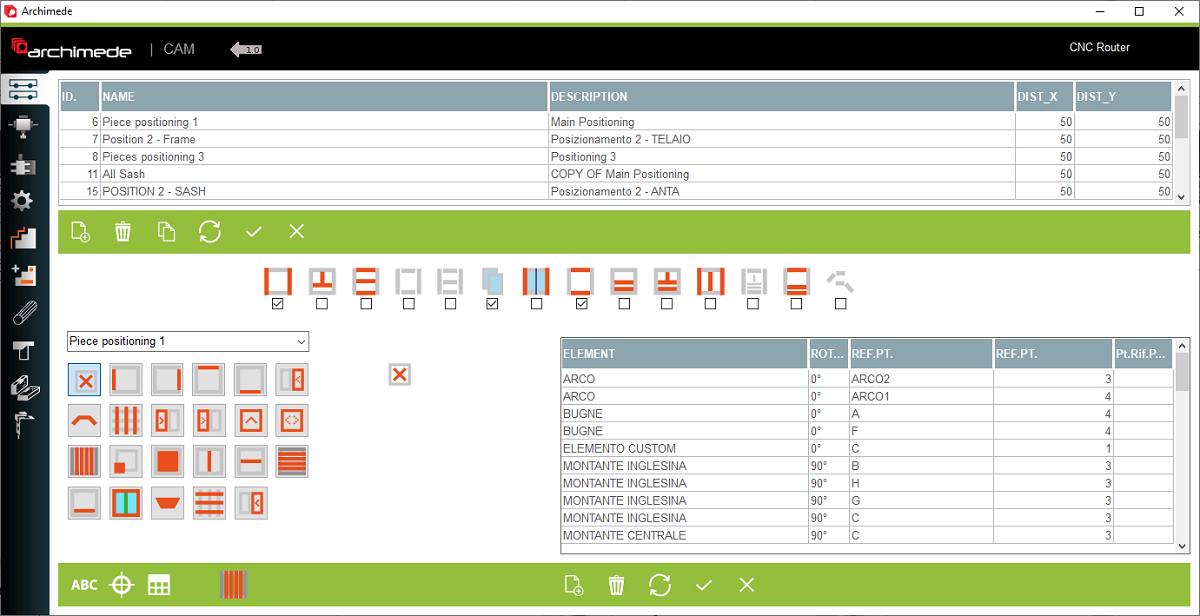


Left and right structure elements in a single program

Central structure elements in a single program

Horizontal elements in one program

Peripheral elements of the structure in one program

Peripheral structure elements and transom elements in one program

Join elements if they are in the same structure type in one program

Join left and right elements if they are in the same structure type in one program

Join the top and bottom elements into one program

Join the horizontal central elements with added transom elements in one program

Join the central elements with added transom elements in one program

Join the central vertical elements with the lateral elements in one program

Join all elements of the structure in one program

Join top and bottom elements with added transom elements in one program

Join logs between structures of the same type in one program

Position of the all elements

Position of the left elements

Position of the right elements

Position of the top elements

Position of the bottom elements

Positioning of the right receiving sash for hewing

Position of arch

Position of vertical woodgrid

Positioning of the left opening sash for hewing

Positioning of the left receiving sash for hewing

Positioning of the tilt window for hewing?

Positioning of the pivot window for hewing

Positioning of the vertical matchboard elements

Positioning of the custom elements. When click on this you can set the individual position for each

Positioning of the panel

Positioning of the central vertical elements

Positioning of the central horizontal elements

Positioning of the horizontal matchboard elements

Positioning of the added transom elements

Positioning of the additional post

Positioning of the logs

Position of horizontal woodgrid

Positioning of the right opening sash for hewing
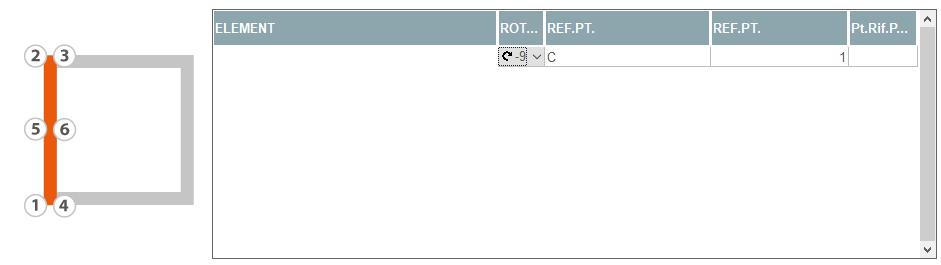


1. Rotation of element
2. Reference point from 8
3. Reference point in relation to the selected element and the points indicated in the opposite picture indicated in point 4
4. Based points
2. Reference point from 8
3. Reference point in relation to the selected element and the points indicated in the opposite picture indicated in point 4
4. Based points


This is a positioning window where the user can manage the position of elements in the table. The positioning ID is used during program generation
The user must select the configuration ID and choose the element to be positioned. In the next step, select the rotation of the element on the table, the base point and the machine point to which it is to be based


