


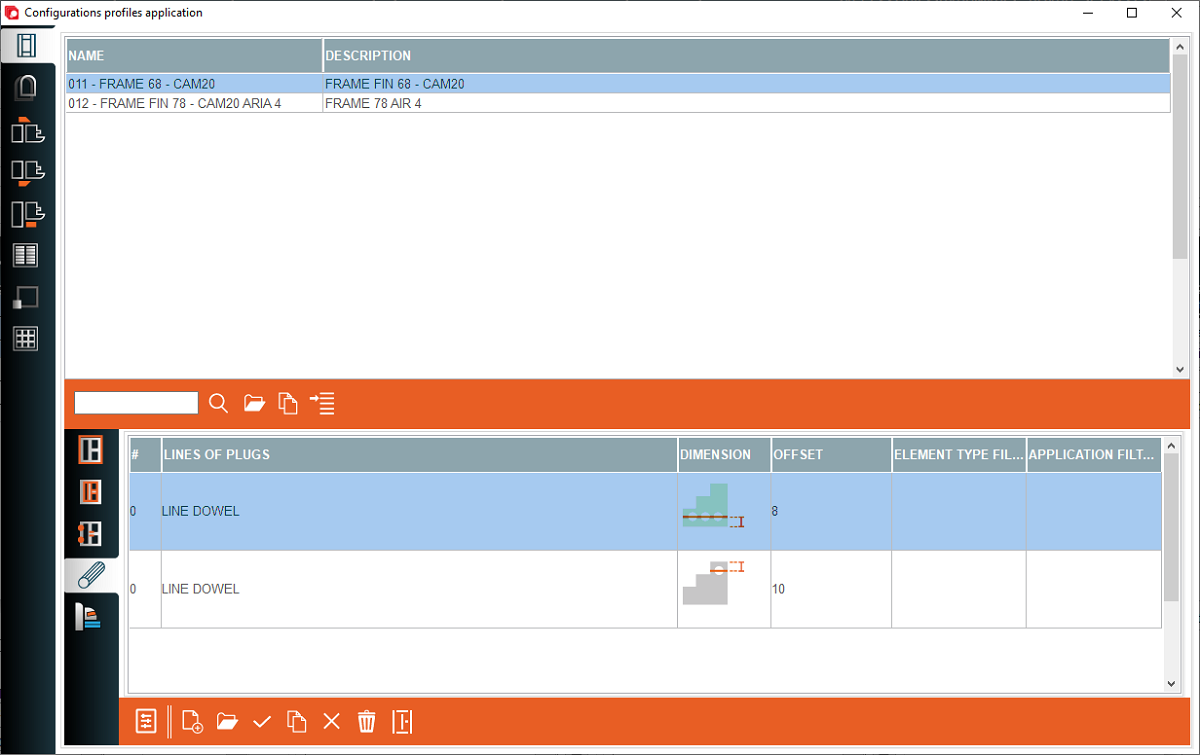


1. Frame - Assigning profile families to the created frame configuration
2. Sash - Assigning profile families to the created sash configuration
3. Internal mould - Assigning profile families to the created internal mould configuration
4. External mould - Assigning profile families to the created external mould configuration
5. Vault - Assigning profile families to the created vault configuration
6. Shutter - Assigning profile families to the created shutter configuration
7. Custom elements - Assigning profile families to the created custom elements configuration
8. Woodgrid - Assigning profile families to the created woodgrid configuration
2. Sash - Assigning profile families to the created sash configuration
3. Internal mould - Assigning profile families to the created internal mould configuration
4. External mould - Assigning profile families to the created external mould configuration
5. Vault - Assigning profile families to the created vault configuration
6. Shutter - Assigning profile families to the created shutter configuration
7. Custom elements - Assigning profile families to the created custom elements configuration
8. Woodgrid - Assigning profile families to the created woodgrid configuration
9. External profile families - Assigning a profile family to the external side of the structure
10. Internal profile families - Assigning a profile family to the internal side of the structure
11. Accessory logic families - Assigning a logic family to the accessory logic for the structure
12. Dowel - A place to set the dowel configuration
13. Glazing bead pre-holes - A place to set the additional working for glazing bead
14. Open configuration - Open the selected configuration
15. Open dowel configuration - Open the selected dowel configuration
16. Open profile families - Open a profile families configuration window
10. Internal profile families - Assigning a profile family to the internal side of the structure
11. Accessory logic families - Assigning a logic family to the accessory logic for the structure
12. Dowel - A place to set the dowel configuration
13. Glazing bead pre-holes - A place to set the additional working for glazing bead
14. Open configuration - Open the selected configuration
15. Open dowel configuration - Open the selected dowel configuration
16. Open profile families - Open a profile families configuration window


This is the place in the program where profile families are assigned for the selected configuration so that the profiles are selected correctly. Separately, profile families are assigned for internal profiles, external profiles and additional logics such as changing clemps or additional cleaning treatments in the case of a arch, etc.


