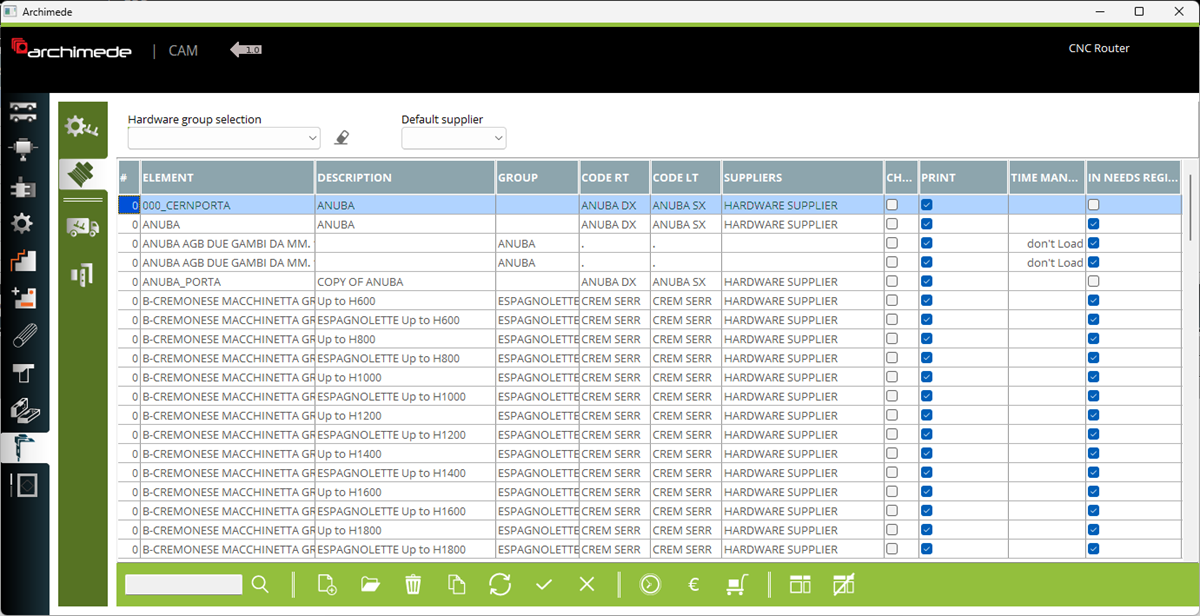



1. Hardware configuration - This is a place wher user can create or edit configuration and set hardware elements in configuration for handle side and for hinges side
2. Hardware elements - This is a place where user can create or edit hardware elements
3. Hardware supplier - This is a place where user can create a hardware supplier
4. Hardware group - This is a place where user can create a hardware group
5. Filter hardware on list by selected group or supplier
6. Sequence on hardware list. Set lower value to see hardware element more up on the list.
7. Name
8. Description
9. Selected hardware group
10. Right code - in case of some hardware the left and right element could have different code
11. Left code
2. Hardware elements - This is a place where user can create or edit hardware elements
3. Hardware supplier - This is a place where user can create a hardware supplier
4. Hardware group - This is a place where user can create a hardware group
5. Filter hardware on list by selected group or supplier
6. Sequence on hardware list. Set lower value to see hardware element more up on the list.
7. Name
8. Description
9. Selected hardware group
10. Right code - in case of some hardware the left and right element could have different code
11. Left code
12. Selected hardware supplier
13. Choice - if the checkbox if selected, the soons element will be displayed on select list
14. Select if visible on printout
15. Time management - select if needed
16. Select if consider in needs
17. Add new hardware element
18. Open element to modify (you can also double click on the selecte element)
19. Remove selecte element
20. Copy selected element
Here you can define each hardware element. Inside the hardware element we can define machining. Next in hardware configuration will be possible when to load elements on project.


